
OntoBricks Architecture
OntoBricks is a web-based Graph Viewer Builder that runs natively on Databricks. The core workflow is:
Overview
OntoBricks is a web-based Graph Viewer Builder that runs natively on Databricks. The core workflow is:
- Design an ontology visually (or import one from OWL / industry standards).
- Map ontology entities to Unity Catalog tables using R2RML.
- Materialize a triple store (Delta table) and a graph backend (Lakebase Postgres).
- Explore the resulting graph viewer — visual navigation, SPARQL, GraphQL, data-quality checks, and reasoning.
Under the hood, SPARQL translates ontology mappings into Spark SQL — users never need to write SPARQL themselves.
High-Level Architecture
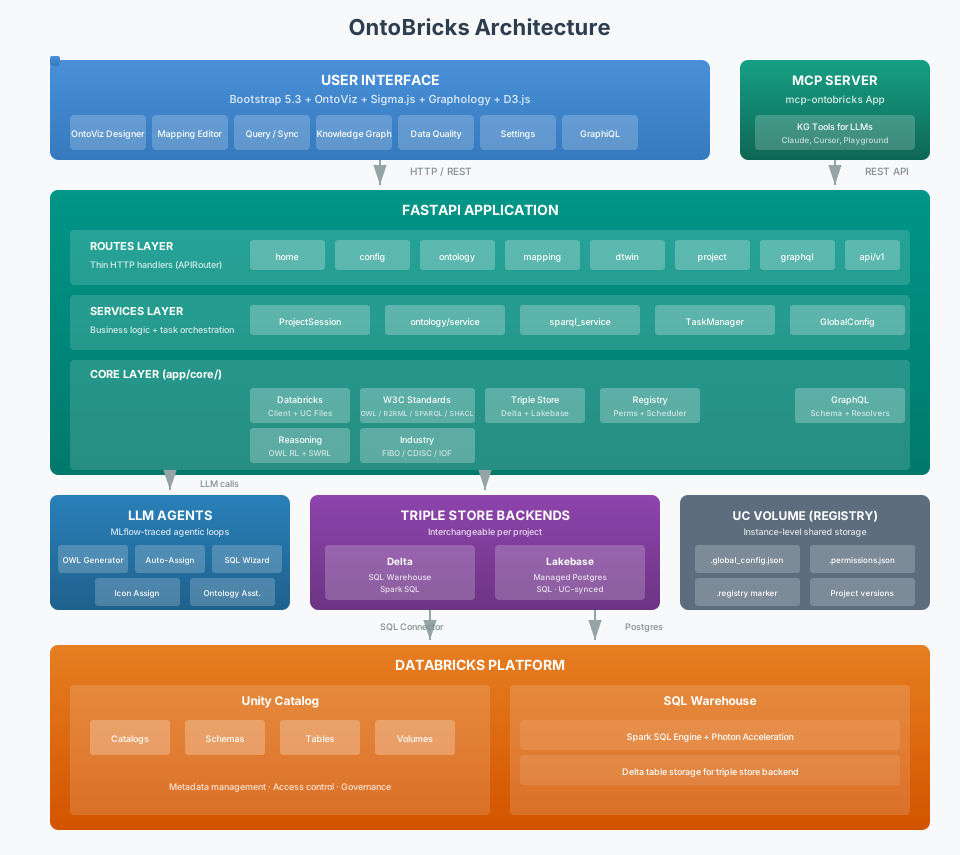
| Layer | What it does |
|---|---|
| User Interface | Bootstrap 5.3 + OntoViz visual editor + Sigma.js / D3.js graph views |
| MCP Server | Separate Databricks App (mcp-ontobricks) exposing knowledge-graph tools to LLM clients (Cursor, Claude Desktop, Playground) |
| FastAPI Application | Routes → Domain Objects → Core layered architecture with GlobalConfigService, PermissionService, and BuildScheduler |
| LLM Agents | MLflow-traced agentic loops for ontology generation, auto-mapping, icon mapping, and conversational assistance |
| Reasoning Engine | OWL 2 RL deductive closure, SWRL rules (compiled to SQL), graph reasoning, and constraint validation |
| Triple Store Backends | Delta-backed view in Unity Catalog plus a per-domain pluggable Graph DB engine (Lakebase Postgres, Unity Catalog Delta, or Neo4j) via the GraphDBFactory pattern, with BFS, shortest path, and transitive closure built in |
| Databricks Platform | Unity Catalog (metadata & governance), SQL Warehouse (query execution), UC Volumes (shared storage) |
Semantic Web Standards Stack
OntoBricks leverages multiple W3C semantic web standards to bridge relational data and graph viewers:
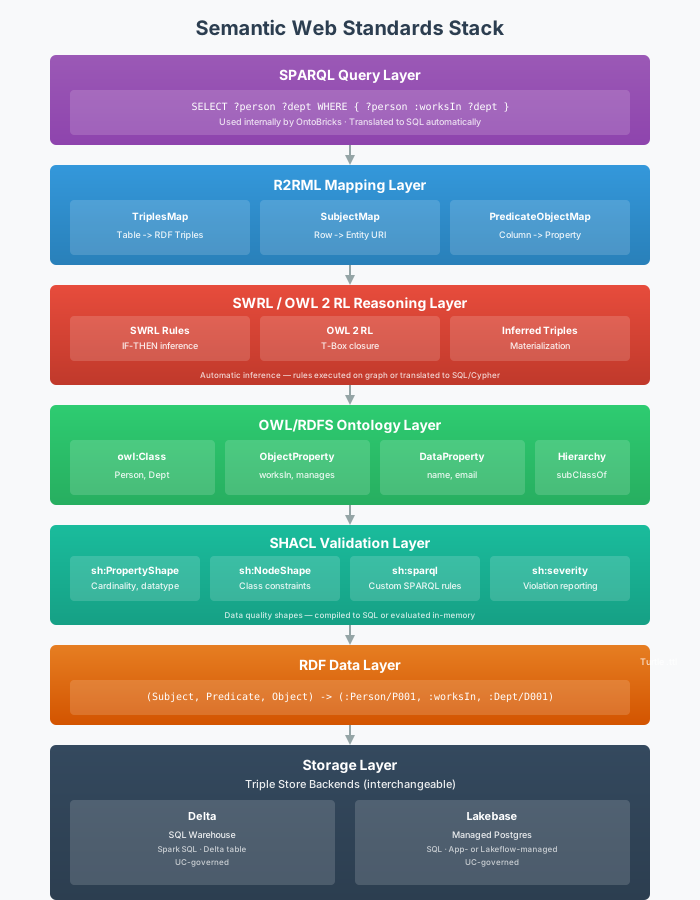
The stack shows how each layer builds upon the previous:
| Layer | Standard | Role in OntoBricks |
|---|---|---|
| Query | SPARQL | Semantic query language (used internally for SQL generation) |
| Validation | SHACL | Shapes Constraint Language for data quality validation |
| Mapping | R2RML | Maps tables to RDF triples |
| Rules | SWRL | Horn-clause rules for inference and violation detection |
| Ontology | OWL/RDFS | Defines classes and properties |
| Data | RDF | Triple data model (S, P, O) |
| Storage | SQL | Delta view (Spark SQL) + Lakebase Postgres flat triple table |
Key Standards Explained
1. RDF (Resource Description Framework)
What it is: The foundational data model for the semantic web. All data is expressed as triples: (Subject, Predicate, Object).
How OntoBricks uses it:
- Entities become RDF resources with URIs (e.g.,
https://example.org/Person/P001) - Relationships become RDF predicates (e.g.,
:worksIn) - Generated using RDFLib library in Python
Example Triple:
<https://example.org/Person/P001> <https://example.org/worksIn> <https://example.org/Department/D001> .2. OWL (Web Ontology Language)
What it is: A knowledge representation language for creating ontologies. Extends RDFS with richer semantics.
How OntoBricks uses it:
- Visual Designer (OntoViz) creates ontologies visually
- Form-based interface for detailed class/property definition
- Classes defined as
owl:Class - Properties defined as
owl:ObjectProperty(relationships) orowl:DatatypeProperty(attributes) - Stored in Turtle (.ttl) format
Generated OWL Example:
@prefix owl: <http://www.w3.org/2002/07/owl#> .
@prefix rdfs: <http://www.w3.org/2000/01/rdf-schema#> .
@prefix : <https://example.org/ontology#> .

:Person a owl:Class ;
    rdfs:label "Person" .

:worksIn a owl:ObjectProperty ;
    rdfs:domain :Person ;
    rdfs:range :Department .
OntoBricks Components:
OntologyGenerator(src/back/core/w3c/owl/OntologyGenerator.py) - Generates OWL from UI configurationOntologyParser(src/back/core/w3c/owl/OntologyParser.py) - Parses existing OWL filesOntoViz(src/front/static/global/ontoviz/ontoviz.js) - Visual ontology designer
3. R2RML (RDB to RDF Mapping Language)
What it is: A W3C standard for expressing mappings from relational databases to RDF.
How OntoBricks uses it:
- Mapping Page generates R2RML automatically
- Maps Databricks tables to RDF classes
- Maps columns to RDF properties
- Maps SQL queries to relationships between entities
- Supports relationship direction (forward, reverse, bidirectional)
R2RML Structure:
@prefix rr: <http://www.w3.org/ns/r2rml#> .
@prefix : <https://example.org/ontology#> .

# Entity Mapping (TriplesMap)
<#PersonMapping> a rr:TriplesMap ;
    rr:logicalTable [ rr:tableName "main.default.person" ] ;
    rr:subjectMap [
        rr:template "https://example.org/Person/{person_id}" ;
        rr:class :Person
    ] ;
    rr:predicateObjectMap [
        rr:predicate rdfs:label ;
        rr:objectMap [ rr:column "name" ]
    ] .

# Relationship Mapping (with SQL Query)
<#WorksInMapping> a rr:TriplesMap ;
    rr:logicalTable [ rr:sqlQuery """
        SELECT person_id, dept_id
        FROM main.default.person_department
    """ ] ;
    rr:subjectMap [
        rr:template "https://example.org/Person/{person_id}"
    ] ;
    rr:predicateObjectMap [
        rr:predicate :worksIn ;
        rr:objectMap [
            rr:template "https://example.org/Department/{dept_id}"
        ]
    ] .
OntoBricks Components:
R2RMLGenerator(src/back/core/w3c/r2rml/R2RMLGenerator.py) - Generates R2RML from mapping configR2RMLParser(src/back/core/w3c/r2rml/R2RMLParser.py) - Parses existing R2RML files
4. SPARQL (SPARQL Protocol and RDF Query Language)
What it is: The standard query language for RDF data, similar to SQL for relational databases.
How OntoBricks uses it:
- SPARQL is used internally to generate Spark SQL from R2RML mappings
- Users do not write SPARQL directly — the system handles translation automatically
- The external REST API (
/api/v1/query) also accepts SPARQL for programmatic access
SPARQL Query Example:
PREFIX ont: <https://example.org/ontology#>
SELECT ?person ?personName ?department
WHERE {
    ?person a ont:Person .
    ?person rdfs:label ?personName .
    ?person ont:worksIn ?department .
}
LIMIT 100
OntoBricks SPARQL-to-SQL Translation:
SparqlTranslator(src/back/core/w3c/sparql/SparqlTranslator.py) implements the translator- Parses SPARQL patterns (subject, predicate, object)
- Maps patterns to table columns using R2RML mappings
- Generates Spark SQL with JOINs, UNION ALL, and STACK functions
5. Query Processing Pipeline (inspired by SANSA)
What it is: OntoBricks translates ontology mappings into SQL queries to extract triples from Databricks tables and materialize them into a Delta view in Unity Catalog and into the domain's configured Graph DB engine (Lakebase Postgres, Unity Catalog Delta, or Neo4j).
How OntoBricks implements this (inspired by the SANSA Stack):
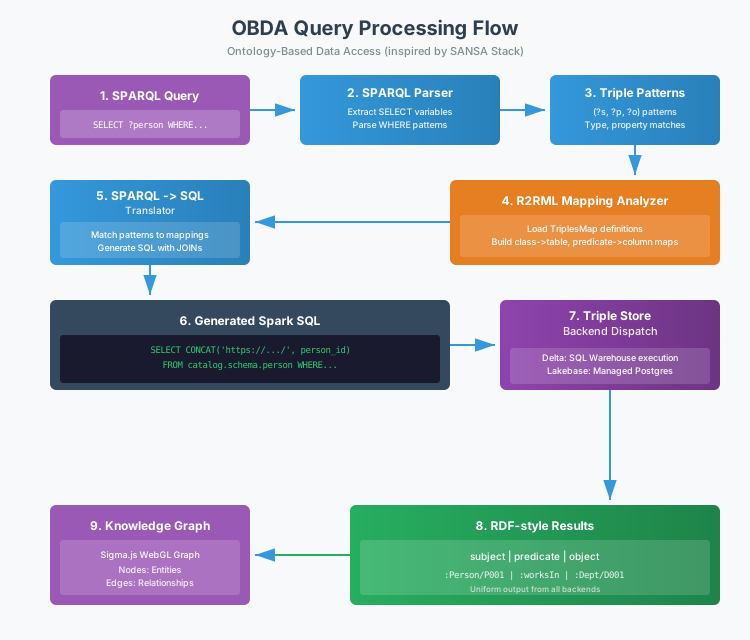
Processing Steps:
- SPARQL Query - Generated internally from ontology and mappings
- SPARQL Parser - Extract SELECT variables, parse WHERE patterns
- Triple Patterns - Identify (subject, predicate, object) patterns
- R2RML Analyzer - Load TriplesMap definitions, build mappings
- SPARQL→SQL Translator - Match patterns to mappings, generate SQL
- Generated Spark SQL - Query with JOINs and UNION ALL
- Triple Store Backend Dispatch - The single
GraphDBFactoryreturns the active engine — a Delta-backed store (DeltaFlatStore) or the Lakebase engine (LakebaseFlatStore). Both subclassGraphDBBackendand expose the same(subject, predicate, object)contract. - RDF-style Results - Uniform (subject, predicate, object) triples from both backends
- Graph Viewer - Sigma.js WebGL-powered graph with entity details panel, search, filtering, and data cluster detection (Louvain/Label Propagation/Greedy Modularity)
Generated Spark SQL Example (for generic triple query):
SELECT DISTINCT subject, predicate, object FROM (
    -- Entity triples (rdf:type and properties)
    SELECT
        CONCAT('https://example.org/Person/', CAST(person_id AS STRING)) AS subject,
        stack(2,
            'http://www.w3.org/1999/02/22-rdf-syntax-ns#type', 'https://example.org/ontology#Person',
            'http://www.w3.org/2000/01/rdf-schema#label', CAST(name AS STRING)
        ) AS (predicate, object)
    FROM main.default.person

    UNION ALL

    -- Relationship triples
    SELECT
        CONCAT('https://example.org/Person/', CAST(person_id AS STRING)) AS subject,
        'https://example.org/ontology#worksIn' AS predicate,
        CONCAT('https://example.org/Department/', CAST(dept_id AS STRING)) AS object
    FROM (SELECT person_id, dept_id FROM main.default.person_department) AS rel_subquery
) AS triples
WHERE object IS NOT NULL
LIMIT 100
Application Architecture
The application follows a clean Routes → Domain objects → Core layered architecture. The FastAPI surface is split across shared, front, and back packages (see FastAPI application split below). The stateless external REST API lives under src/api/ and is mounted by the shared app factory.
Layered Design
| Layer | Components | Responsibility |
|---|---|---|
| Routes | HTML: src/front/routes/*.py; session-aware JSON: src/api/routers/internal/*.py |
Thin HTTP handlers (request/response only) |
| Domain Objects | Classes in src/back/objects/ |
Business logic, validation, transformation (routes call domain classes directly) |
| Core | back/core/helpers/, DatabricksClient, VolumeFileService, OWL/R2RML generators, triple-store factory, GlobalConfigService, PermissionService, BuildScheduler |
Shared utilities, Databricks connectivity, backend abstraction |
| Services | src/back/services/ (e.g. home.py) |
Page-level orchestration where routes delegate beyond raw domain objects |
| Frontend | OntoViz, Sigma.js, Graphology, D3.js, Bootstrap; src/front/templates/, src/front/static/ |
Visual design, graph rendering, UI |
FastAPI application split
The ASGI app is built in src/shared/fastapi/main.py (create_app()), which wires middleware, static files, and routers. Responsibilities are divided as follows:
| Package | Location | Role |
|---|---|---|
| shared | shared/fastapi/main.py, shared/fastapi/health.py, shared/fastapi/csrf.py, shared/fastapi/timing.py |
Application factory, CORS / session / permission / CSRF / request-timing middleware, /static mount, health and root endpoints; includes routers from front.routes, api.routers.internal, and mounts the external API |
| front | front/fastapi/dependencies.py |
Jinja2 templates and shared FastAPI/Starlette dependencies for HTML routes |
| back | back/fastapi/graphql_routes.py |
GraphQL router (per-domain auto-generated schema) |
Uvicorn entry point: shared.fastapi.main:app (see run.py, which imports create_app() from shared.fastapi.main).
Configuration Split
OntoBricks separates configuration into several layers:
| File | Purpose | Examples |
|---|---|---|
src/shared/config/settings.py |
Environment-specific settings loaded from .env / env vars via Pydantic BaseSettings |
Databricks host, token, session directory |
src/shared/config/constants.py |
Static constants and defaults that rarely change and are shared across modules | App name/version, OWL namespaces, LLM defaults, wizard quick-templates |
src/front/config/menu_config.json |
Navbar + sidebar navigation for the Jinja2 UI | Page labels, Bootstrap Icons (icon), menu structure; top-level icons must stay distinct (Registry bi-boxes, Domain bi-box, Ontology bi-bezier2, Mapping bi-shuffle, Knowledge Graph bi-radar) and match breadcrumb.js _ROUTE_MAP |
src/back/objects/session/GlobalConfigService.py |
Instance-level GlobalConfigService — admin-editable settings stored in the registry (global_config JSONB, or .global_config.json on Volume-backed registries), shared across all user sessions |
SQL Warehouse ID, default base URI, default class icon, UI branding (ui_branding) |
src/back/objects/registry/permissions.py |
PermissionService — stores per-user permission levels in .permissions.json (app-wide) and per-domain overrides in .domain_permissions.json (per domain folder). Defines the role hierarchy: admin > builder > editor > viewer > none. |
CAN MANAGE admin flag |
src/shared/config/constants.py key contents:
| Constant | Description |
|---|---|
APP_NAME, APP_VERSION |
Application identity |
ONTOBRICKS_NS |
RDFLib Namespace for the OntoBricks schema (http://ontobricks.com/schema#) |
DEFAULT_BASE_URI |
Default ontology base URI |
LLM_DEFAULT_MAX_TOKENS, LLM_DEFAULT_TEMPERATURE |
LLM generation defaults |
WIZARD_TEMPLATES |
Ontology generation quick-templates (served to the frontend via GET /ontology/wizard/templates) |
AUTO_ASSIGN_CHUNK_SIZE |
Max entities + relationships per auto-map agent run (default: 5) |
AUTO_ASSIGN_CHUNK_COOLDOWN |
Seconds to wait between agent chunks to avoid LLM rate limits (default: 15) |
To add a new generation template, add an entry to WIZARD_TEMPLATES in src/shared/config/constants.py — the UI button is rendered dynamically.
src/back/objects/session/GlobalConfigService.py (GlobalConfigService singleton):
| Setting | Description | Modified By |
|---|---|---|
warehouse_id |
SQL Warehouse ID used by all backends and API calls | Admin only |
default_base_uri |
Default ontology base URI domain | Admin only |
default_emoji |
Default class icon emoji (e.g. 📦) |
Admin only |
ui_branding |
Versioned object: app_title, primary_color, logo_data_url (empty = bundled favicon) |
Admin only (GET/POST /settings/ui-branding) |
The service caches the document in memory with a TTL. Persistence goes through the active RegistryStore (save_global_config / load_global_config), so Lakebase and Volume backends keep the same keys. Settings are resolved via resolve_warehouse_id(), resolve_default_base_uri(), and resolve_default_emoji() in src/back/core/helpers/. UI branding is normalized by normalize_ui_branding() (src/back/core/helpers/UIBranding.py) and injected per HTML request by UIBrandingMiddleware. Version-scoped UC paths are derived through effective_uc_version_path in DatabricksHelpers.py.
UC Volume file layout (root of the configured registry volume):
/Volumes/{catalog}/{schema}/{volume}/
├── .registry                  # Marker file (presence = initialized)
├── .global_config.json        # Instance-level admin settings (includes build schedules)
├── .permissions.json          # App-wide per-user permission levels (viewer / editor / builder)
└── domains/                   # Domain version files (legacy registries may use `projects/`)
    └── {domain_name}/
        ├── .domain_permissions.json  # Optional per-domain role overrides
        ├── V1/
        │   ├── V1.json                                    # Domain version payload
        │   └── documents/                                 # Version-scoped documents
        ├── V2/
        │   ├── V2.json
        │   └── documents/
        └── ...
Key Design Principles
- Separation of Concerns: Routes handle HTTP, services handle logic
- Session State: Custom file-based session stores ontology, mappings, R2RML between requests
- Modular UI: Sidebar layout with reusable partials per page
- No Manual Query Writing: SPARQL is used internally — translated to SQL automatically for triple materialization
- Visual-First Design: OntoViz enables drag-and-drop ontology creation
- Agentic Automation: LLM-powered agents with MCP-style tools handle complex tasks autonomously (see Agentic Architecture)
- Observability: MLflow tracing captures every agent → LLM → tool span for debugging, cost tracking, and evaluation
- MCP Integration: The MCP server exposes knowledge-graph tools (entity search, GraphQL queries, domain selection) to LLM clients via the Model Context Protocol (see MCP Server)
Module Structure
The application follows a strict code organization pattern (see src/.coding_rules.md):
- Routes — HTML handlers live in
src/front/routes/; session-aware JSON endpoints live insrc/api/routers/internal/. Keep routing thin (no business rules or data access in route functions). - Domain objects (
back.objects) hold business logic; routes call them directly unless they use a small service insrc/back/services/. - Core (
back.core) holds reusable infrastructure, Databricks connectivity, and W3C standards. - Front — Jinja2 templates are consolidated under
src/front/templates/; static assets undersrc/front/static/; menu config undersrc/front/config/. - Shared — App factory, health routes, and cross-cutting settings/constants (
shared.config). - All Python files in
core/andobjects/use PascalCase naming (e.g.DatabricksClient.py).
src/
├── shared/                             # Shared app shell & configuration
│   ├── fastapi/
│   │   ├── main.py                     # Application factory (create_app), middleware, router registration
│   │   ├── health.py                   # Health check & root endpoints
│   │   ├── csrf.py                     # CSRF double-submit cookie middleware
│   │   └── timing.py                   # Request duration logging middleware
│   └── config/
│       ├── settings.py                 # Pydantic BaseSettings (env vars, .env)
│       └── constants.py                # Static constants & defaults (namespaces, LLM params, wizard templates)
│
├── front/                              # HTML UI: routes, templates, static, menu
│   ├── fastapi/
│   │   └── dependencies.py             # Jinja2 templates & shared dependencies for HTML routes
│   ├── config/
│   │   └── menu_config.json            # Sidebar navigation structure
│   ├── routes/                         # HTML page routers (home, ontology, mapping, graph viewer, project)
│   ├── templates/                      # Consolidated Jinja2 templates (partials per feature area)
│   └── static/                         # Static assets (css/, js/, img/, ontoviz/, per-area folders)
│
├── back/                               # Backend: domain, core infra, GraphQL
│   ├── fastapi/
│   │   └── graphql_routes.py           # GraphQL API (auto-generated schema per domain)
│   ├── services/                       # Optional page-level services (e.g. home.py)
│   ├── core/                           # Core infrastructure
│   │   ├── helpers/                    # Centralized helper functions
│   │   │   ├── DatabricksHelpers.py
│   │   │   ├── SQLHelpers.py
│   │   │   └── URIHelpers.py
│   │   ├── logging/                    # Centralized logging (dictConfig via LogManager)
│   │   │   └── LogManager.py
│   │   ├── task_manager/               # In-memory async task runner (threading-based)
│   │   │   └── TaskManager.py
│   │   ├── errors/                     # Centralized error hierarchy
│   │   │   ├── OntoBricksError.py      # Base error class
│   │   │   ├── ValidationError.py
│   │   │   ├── NotFoundError.py
│   │   │   ├── AuthorizationError.py
│   │   │   ├── ConflictError.py
│   │   │   ├── InfrastructureError.py
│   │   │   └── ErrorResponse.py
│   │   │
│   │   ├── databricks/                 # Databricks connectivity
│   │   │   ├── DatabricksAuth.py       # Authentication & utility functions
│   │   │   ├── DatabricksClient.py     # Thin facade
│   │   │   ├── SQLWarehouse.py         # Query execution, DDL (connection-pooled)
│   │   │   ├── unity_catalog/          # Unity Catalog metadata, volumes, domain I/O
│   │   │   │   ├── UnityCatalog.py     # Catalogs, schemas, tables, volumes
│   │   │   │   ├── VolumeFileService.py # File I/O on UC Volumes
│   │   │   │   ├── UCDomainIO.py       # Domain I/O on UC Volumes
│   │   │   │   └── MetadataService.py  # Table metadata
│   │   │   ├── WorkspaceService.py     # SCIM users/groups
│   │   │   ├── DashboardService.py     # Lakeview + legacy dashboards
│   │   │
│   │   ├── w3c/                        # W3C semantic web standards
│   │   │   ├── owl/                    # OntologyGenerator, OntologyParser
│   │   │   ├── r2rml/                  # R2RMLGenerator, R2RMLParser
│   │   │   ├── rdfs/                   # RDFSParser
│   │   │   ├── sparql/                 # SparqlTranslator, SparqlQueryRunner, DomainQueryService
│   │   │   └── shacl/                  # SHACLGenerator, SHACLParser, SHACLService
│   │   │
│   │   ├── graphql/                    # GraphQLSchemaBuilder, ResolverFactory, SchemaMetadata
│   │   ├── graphdb/                    # Single triple store / graph DB abstraction
│   │   │   ├── GraphDBBackend.py       # Abstract base (CRUD + named queries + graph ops)
│   │   │   ├── GraphDBFactory.py       # Engine factory (auto / lakebase / delta / view)
│   │   │   ├── constants.py            # RDF_TYPE, RDFS_LABEL
│   │   │   ├── delta/                  # DeltaFlatStore (SQL Warehouse engine)
│   │   │   ├── lakebase/               # LakebaseFlatStore, LakebaseBase, SyncedTableManager
│   │   │   └── _starter_kit/           # ExampleStore template for new engines
│   │   │
│   │   ├── reasoning/                  # Reasoning engine (OWL 2 RL + SWRL + SPARQL rules + Decision tables)
│   │   │   ├── ReasoningService.py     # Multi-phase orchestrator
│   │   │   ├── OWLRLReasoner.py        # OWL 2 RL deductive closure via owlrl
│   │   │   ├── SWRLEngine.py           # SWRL rule execution, backend dispatch
│   │   │   ├── SWRLParser.py           # SWRL rule parsing
│   │   │   ├── SWRLSQLTranslator.py    # SWRL → Spark/Postgres SQL
│   │   │   ├── SWRLBuiltinRegistry.py  # SWRL built-in function registry
│   │   │   ├── SPARQLRuleEngine.py     # SPARQL-based rule execution
│   │   │   ├── AggregateRuleEngine.py  # Aggregate rule support
│   │   │   ├── DecisionTableEngine.py  # Decision table evaluation
│   │   │   └── models.py               # InferredTriple, RuleViolation, ReasoningResult
│   │   │
│   │   ├── industry/                   # Industry-standard ontology importers
│   │   │   ├── fibo/                   # FiboImportService
│   │   │   ├── cdisc/                  # CdiscImportService
│   │   │   └── iof/                    # IofImportService
│   │   │
│   │   ├── graph_analysis/             # Community detection & clustering
│   │   │   ├── CommunityDetector.py    # CommunityDetector (NetworkX backend)
│   │   │   └── models.py              # ClusterRequest, ClusterResult, DetectionResult, DetectionStats
│   │   │
│   │   └── sqlwizard/                  # SQL generation helpers for entity mapping
│   │       └── SQLWizardService.py
│   │
│   └── objects/                        # Domain objects (business logic layer)
│       ├── ontology/                   # Ontology domain (ontology.py, json_views.py)
│       ├── mapping/                    # Mapping domain (mapping.py, json_views.py)
│       ├── domain/                     # Saved domain / UC I/O (domain.py, payload.py, version_status.py)
│       ├── digitaltwin/                # Knowledge Graph domain (DigitalTwin.py, models.py)
│       ├── session/                    # Session management
│       │   ├── middleware.py           # File-based session middleware (cookie + ASGI)
│       │   ├── SessionManager.py       # Request-scoped session get/set/delete wrapper
│       │   ├── DomainSession.py       # DomainSession (current OntoBricks domain payload)
│       │   └── GlobalConfigService.py  # Instance-level GlobalConfigService
│       └── registry/                   # Registry, permissions & scheduled builds
│           ├── service.py              # RegistryService + RegistryCfg
│           ├── permissions.py          # PermissionService (ADMIN / BUILDER / EDITOR / VIEWER / NONE + domain-level overrides)
│           └── scheduler.py            # BuildScheduler (APScheduler-based)
│
├── api/                                # REST API layer (mounted into the main app)
│   ├── external_app.py                 # External stateless API app factory (/api/v1/…)
│   ├── service.py                      # API business logic
│   └── routers/
│       ├── v1.py                       # /api/v1/* endpoints
│       ├── domains.py                  # Domain registry & artifact endpoints (`/api/v1/domains`, `/api/v1/domain/...`)
│       ├── digitaltwin.py              # Knowledge Graph REST API
│       └── internal/                   # Session-aware JSON routes for the web UI
│           ├── home.py, settings.py, domain.py, ontology.py, mapping.py, dtwin.py, tasks.py, …
│
├── agents/                             # LLM Agents
│   ├── llm_utils.py                    # Shared LLM call with retry (429/503 backoff)
│   ├── serialization.py                # Agent serialization utilities
│   ├── tracing.py                      # MLflow tracing setup & decorators
│   ├── tools/                          # Shared agent tools (ontology, mapping, metadata, SQL, etc.)
│   ├── agent_owl_generator/            # OWL ontology generation agent
│   ├── agent_auto_assignment/          # Entity/relationship → SQL mapping agent
│   ├── agent_auto_icon_assign/         # Emoji icon mapping agent
│   └── agent_ontology_assistant/       # Conversational assistant + ResponsesAgent wrapper
│
└── mcp-server/                         # MCP Server (separate Databricks App; under src/)
    ├── app.yaml                        # Databricks App config (also rendered via DAB)
    ├── deploy-mcp-server.sh            # Legacy standalone deploy (prefer `make deploy`)
    ├── pyproject.toml                  # Python dependencies
    └── server/
        ├── app.py                      # MCP tools, domain selection, text formatting
        └── main.py                     # Entry point

tests/                                  # Test suite (at project root)
├── conftest.py
├── e2e/                                # End-to-end tests
│   └── test_e2e_flows.py
├── test_lakebase_flat_store.py
├── test_synced_table_manager.py
├── test_reasoning.py
├── test_reasoning_service.py
├── test_permissions.py
├── test_registry.py
├── test_triplestore_factory.py
├── test_graphql.py
├── test_sparql_service.py
├── test_owl_generator.py
├── test_owl_parser.py
├── test_r2rml_generator.py
├── test_r2rml_parser.py
├── ... (50+ test modules)
OntoViz Component Architecture
OntoViz is a custom JavaScript library for visual entity-relationship diagram editing. It is designed to be reusable and can be integrated into other projects.
For complete documentation, see OntoViz Documentation.
Key Features
| Feature | Description |
|---|---|
| Entities | OWL Classes with icons, names, and data properties |
| Relationships | OWL Object Properties with direction and attributes |
| Inheritances | rdfs:subClassOf links with property inheritance |
| Canvas Controls | Zoom, pan, auto-layout, minimap |
| Serialization | JSON export/import for persistence |
Core Classes
class Entity {
    id, name, icon, description, properties, x, y
}

class Relationship {
    id, name, sourceEntityId, targetEntityId, direction, properties
}

class Inheritance {
    id, sourceEntityId, targetEntityId
}

class OntoViz {
    // Entity, Relationship, Inheritance management
    // Layout & navigation
    // JSON serialization
}
Inheritance Feature
Inheritance links represent rdfs:subClassOf relationships in OWL:
- Visual representation: Dotted line with hollow arrow from parent to child
- Drag-and-drop creation: Click △ toolbar button, then drag from parent connector to child entity
- Property inheritance: Child entities automatically inherit and display parent's properties (read-only)
- OWL generation: Produces
rdfs:subClassOftriples in the generated OWL - Cascade updates: When parent properties change, child entities are automatically updated
User Interface Architecture
The UI uses a consistent sidebar layout across all main pages:
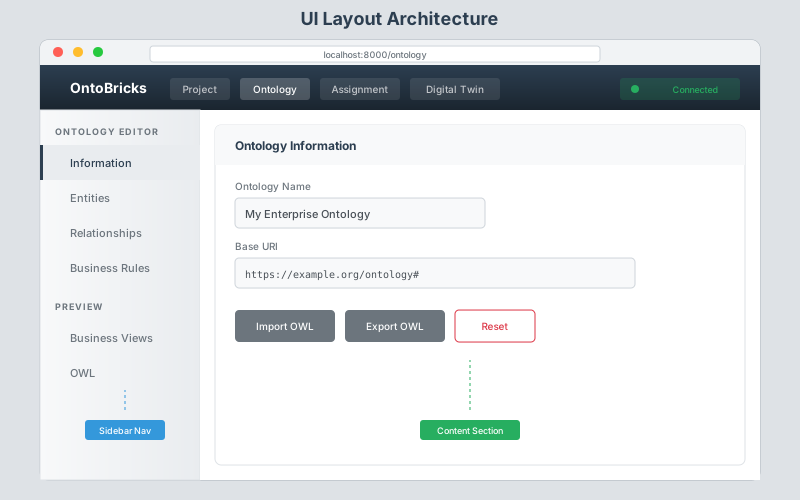
UI Components
| Component | File | Purpose |
|---|---|---|
| Base Template | base.html |
Navbar, global CSS/JS |
| Sidebar Layout | sidebar-layout.css |
Reusable sidebar + content structure |
| Sidebar Nav | sidebar-nav.js |
Tab-like navigation controller |
| Partials | partials/_*.html |
Section content (information, entities, etc.) |
| Core JS | ontology-core.js, mapping-core.js |
Shared state and functions |
| OntoViz | ontoviz.js, ontoviz.css |
Visual ontology designer |
Page Structure
Each main page (Ontology, Mapping, Knowledge Graph) follows this pattern:
page.html
├── sidebar-layout (container)
│   ├── sidebar-nav (left menu)
│   │   ├── Section group 1
│   │   │   └── Nav links (data-section="...")
│   │   └── Section group 2
│   │       └── Nav links
│   └── sidebar-content (right area)
│       ├── section#design-section
│       │   └── {% include "partials/_ontology_design.html" %}
│       ├── section#entities-section
│       │   └── {% include "partials/_ontology_entities.html" %}
│       └── ... more sections
└── page-specific scripts
Data Flow
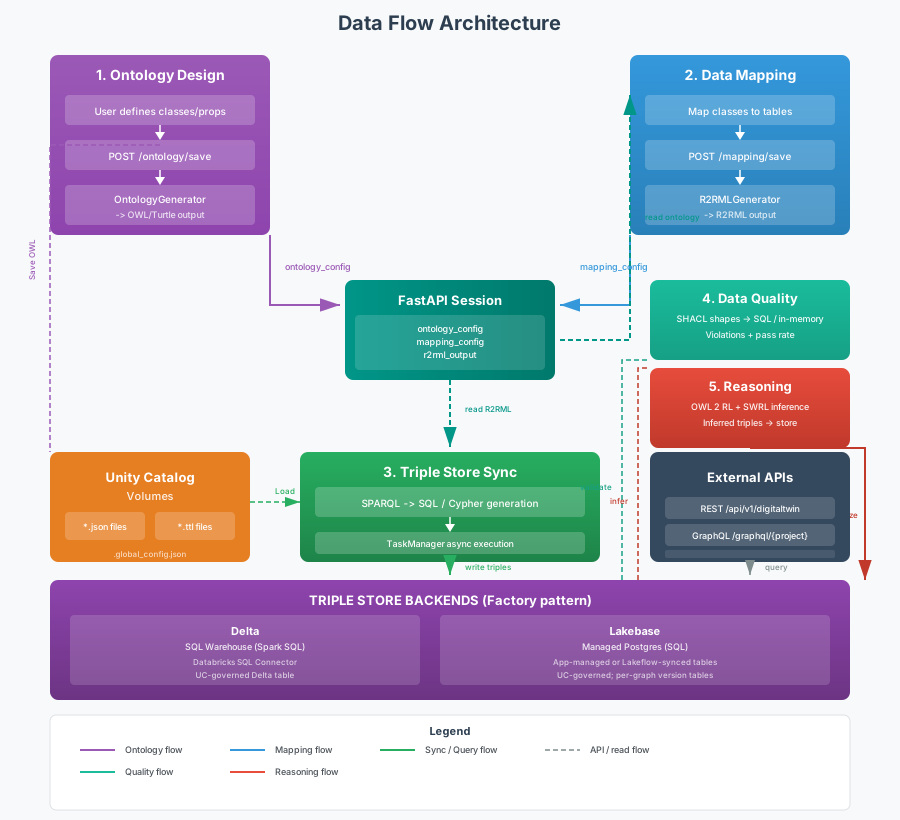
Flow Summary
| Flow | Steps | Key Components |
|---|---|---|
| Design | Visual design → Auto-save → Session storage | OntoViz, Session middleware |
| Ontology | Design/Configure → Save → Generate OWL | OntologyGenerator, Session middleware |
| Mapping | Load ontology → Map/Auto-Map → Validate attributes → Generate R2RML | R2RMLGenerator, SQLWizardService, TaskManager |
| Knowledge Graph | Build → Quality Check (async) → Auto-load Triples → Explore Graph Viewer | sparql_service, TaskManager, Sigma.js graph |
| API/MCP | REST → resolve domain → triple store query → formatted response | Knowledge Graph API, MCP Server, GraphQL |
Asynchronous Task Processing
Long-running operations use the TaskManager pattern (src/back/core/task_manager/TaskManager.py), an in-memory singleton that manages background tasks:
| Task Type | Triggered By | Description |
|---|---|---|
triplestore_sync |
Knowledge Graph → Build | Generates and writes triples to Delta and the domain's configured Graph DB engine (Lakebase, Delta, or Neo4j) |
quality_checks |
Knowledge Graph → Quality | Runs all quality checks sequentially with per-check progress |
auto_assign |
Mapping → Auto-Map | Batch-maps entities and relationships via LLM; splits large jobs into chunks of AUTO_ASSIGN_CHUNK_SIZE with cooldown between chunks to avoid rate limits |
How it works:
- Frontend sends a
POSTto start the task; backend creates aTaskManagertask and spawns athreading.Thread - Frontend stores the
task_idinsessionStorageand polls/tasks/{task_id}for progress - Backend thread updates progress (percentage, current step message) via
TaskManager - On completion, the task result is returned to the frontend, which saves mappings and updates the UI
- If the user navigates away and returns, the frontend resumes monitoring from
sessionStorage
Scheduled Builds (BuildScheduler)
The BuildScheduler (src/back/objects/registry/scheduler.py) provides per-domain scheduled triple store builds using APScheduler's BackgroundScheduler. Schedule definitions are persisted in .global_config.json on the UC Volume alongside other instance-level settings.
Each schedule entry contains:
| Field | Description |
|---|---|
interval_minutes |
How often to run (2, 5, 10, 30, 60, 360, 720, 1440) |
drop_existing |
Whether to replace data on each build |
enabled |
Whether the schedule is active |
last_run |
ISO timestamp of the last execution |
last_status |
"success" / "error" / null |
last_message |
Human-readable outcome of the last run |
Jobs are restored at startup from environment-variable credentials when available. If registry config is session-only, jobs are lazily registered when a user opens the Schedule tab.
Session State
The session middleware maintains state using a unified domain session pattern (implemented by DomainSession):
| Key | Contents | Set By |
|---|---|---|
project_data |
Complete domain: info, ontology, mapping, design_layout, databricks, preferences, generated | DomainSession |
Unified Session Structure:
{
    "info": { "name", "description", "author" },
    "current_version": "1.0",
    "ontology": {
        "name", "base_uri", "classes", "properties",
        "constraints", "swrl_rules", "axioms"
    },
    "assignment": {
        "entities", "relationships",
        "r2rml_output"  # Runtime only, not exported
    },
    "design_layout": { "entities", "relationships", "inheritances", "positions" },
    "databricks": { "host", "token" },  # Not exported; warehouse_id is in GlobalConfigService
    "preferences": { },                 # Not exported; emoji/base URI are in GlobalConfigService
    "generated": { "owl", "sql" }       # Not exported
}
Session Service Pattern:
The DomainSession class (src/back/objects/session/DomainSession.py) provides:
- Unified access to all domain data
- Automatic migration from legacy session keys
- Export/import for file persistence
- Version management support
Registry Storage
Since v0.4.0 the domain registry lives in Databricks Lakebase (Postgres). The historical JSON-on-Volume backend was removed — operators with pre-v0.4.0 deployments must run scripts/migrations/migrate-registry-to-lakebase.sh once before upgrading. The Unity Catalog Volume is still wired in but is now reserved for binary artefacts (documents/ uploads and registry export bundles).
| Storage | Identifier | What lives in it |
|---|---|---|
| Databricks Lakebase (Postgres) | lakebase |
Domain JSON, permissions, schedules, history, global config — normalised into seven Postgres tables (with JSONB columns for the larger blobs) |
| Unity Catalog Volume | n/a | documents/ uploads + ad-hoc registry exports |
The single :class:RegistryStore implementation (LakebaseRegistryStore) is constructed via RegistryFactory.from_cfg. Route handlers and services talk to the abstract interface and stay storage-agnostic.
Volume layout (binaries only)
Unity Catalog
└── catalog (e.g., main)
    └── schema (e.g., ontobricks)
        └── volume (e.g., OntoBricksRegistry)
            └── domains/
                └── {domain_name}/
                    ├── V1/
                    │   └── documents/           # user-uploaded files
                    ├── V2/…
                    └── V3/…
Lakebase layout
The Postgres schema (default ontobricks_registry) holds fifteen relational tables:
| Table | Purpose |
|---|---|
registries |
One row per (catalog, schema, volume) triplet — scopes everything else |
global_config |
Instance-wide settings (warehouse, emoji, base URI, ui_branding, …) as JSONB |
domains |
Stable per-domain identity (UUID, name, base URI, description) plus mcp_policy — a JSONB blob holding the per-domain MCP policy (which tools the domain publishes, how its ontology attachments are surfaced). Defaults to {}, which reproduces pre-0.8 behaviour, so no backfill is needed |
domain_versions |
Per-version JSONB document; mirrors what V{N}.json used to hold |
domain_permissions |
Per-domain ACL (replaces .domain_permissions.json) |
domain_edit_locks |
Advisory per-domain edit locks for collaborative editing |
schedules |
Active scheduled-build configuration |
schedule_runs |
Ring-buffered run history per domain |
build_runs |
Append-only build-run trace (all paths) keyed by (domain_id, version) for analytics; active build = latest successful run |
graph_analytics |
Cache of the LAST knowledge-graph metrics result (centrality/structure) keyed by (domain_id, version); one row, replaced on every successful async recompute (UPSERT). Backs the KG Analytics page and the Domain Validation cockpit |
graph_analytics_runs |
Append-only history of every analytics run launched (success or failure) keyed by (domain_id, version); lightweight per-run metadata (node/edge counts, components, avg degree, density, duration, scope, status). Capped per tuple. Backs the KG Analytics "History" tab |
domain_review_events |
Append-only review/validation audit log (submit / sign-off / publish / reopen / comment) keyed by (domain_id, version) |
domain_change_events |
Append-only ontology/mapping change audit ("who changed what, and when") keyed by (domain_id, version). Fine-grained edits (class/property/mapping add/update/remove, imports, resets) are buffered in the working session as they happen and flushed here in one batch on save-to-registry; source tags human vs AI-assistant edits; occurred_at is the real edit time, created_at the flush time |
domain_comments |
Domain-wide threaded discussion keyed by (domain_id, version); parent_id links replies, resolved closes a thread |
domain_tasks |
Personalised work items assigned to a teammate (usually born from a comment); status walks open → in_progress → done (or cancelled), surfaced in the assignee's "My Tasks" worklist |
Authentication is fully app-managed: the Databricks Apps runtime injects PGHOST/PGPORT/PGDATABASE/PGUSER and OntoBricks mints a short-lived OAuth token via WorkspaceClient().config.authenticate() (back/core/databricks/LakebaseAuth.py). No user secrets are stored. OntoBricks targets Lakebase Autoscaling exclusively (the default tier since 2026-03-12); Provisioned instances are not supported. The connection layer retries on SQLSTATE 57P03 to absorb scale-from-zero cold-starts.
Binary artefacts (documents/ uploads and registry export bundles) continue to live on the Unity Catalog Volume above, managed by VolumeFileService.
Export Format (Versioned)
Domains are exported in a versioned JSON format:
{
    "info": {
        "name": "My Domain",
        "description": "...",
        "author": "...",
        "mcp_policy": { /* per-domain MCP tool + context policy; {} when unconfigured */ }
    },
    "versions": {
        "1": {
            "ontology": { /* classes, properties, constraints, rules, axioms */ },
            "assignment": { /* entity and relationship mappings */ },
            "design_layout": { /* OntoViz visual state */ }
        }
    }
}
info also carries the domain-level flags the registry needs to serve the domain: mcp_enabled, status, review_quorum, graph_backend, lakehouse_materialization and mcp_policy. The policy is re-validated on both export and import, so a hand-edited or older bundle can never inject an unknown tool name — unrecognised entries are dropped rather than rejected.
What is NOT Saved
For security and regeneration reasons, these are excluded from exports:
- Databricks credentials (host, token)
- Instance-level settings (warehouse_id, base URI, emoji — stored in
GlobalConfigService) - R2RML output (regenerated from mappings on load)
- OWL output (regenerated from ontology on load)
- Query results (ephemeral data)
- User preferences (runtime only)
API Endpoints
| Endpoint | Method | Description |
|---|---|---|
/domain/list-versions |
GET | List all versions of a domain |
/domain/save-to-uc |
POST | Save domain to Unity Catalog |
/domain/load-from-uc |
POST | Load a version from UC; on a domain switch closes the previously-open domain (releases its edit-lock) before loading, and returns a lock block |
/domain/close |
POST | Release the loaded version's edit-lock and reset the session |
/domain/create-version |
POST | Create new version (increment) |
/domain/version-status |
GET | Get current version status |
Version Workflow
- First Save: Creates
domains/{name}/V1/V1.json - Update Save: Overwrites
domains/{name}/V{ver}/V{ver}.json - Create Version: Increments the version number, copies documents from the previous version directory
- Load Version: Loads the requested version from
V{ver}/V{ver}.json, regenerates R2RML and OWL
Auto-Save Flow (Design View)
User Action → OntoViz Event → Debounce → syncDesignToOntology → /ontology/save → Session UpdateTriple Store & Graph DB Backends
OntoBricks separates two concerns:
- Triple Store (Lakehouse UC objects) — a family of Unity Catalog objects in the registry
catalog.schema, always created by Knowledge Graph → Build. Not a single view: see Lakehouse Unity Catalog objects below. - Graph DB — the queryable graph engine used by the Knowledge Graph, reasoning, and BFS / shortest-path helpers. Pluggable via the
GraphDBFactoryabstraction. When the per-domain backend isdatabricks, the Graph DB is those Delta tables; when it islakebaseorneo4j, Build also mirrors triples into that engine.
The active Graph DB engine is chosen per domain via graph_backend (none | lakebase | databricks | neo4j), set under Domain → Information → Knowledge Graph; connection settings live under Settings → Back end. none is the ontology-only mode: no graph is built and the MCP surface exposes ontology information only.
| Layer | Key | Storage | Query Language | Source of truth |
|---|---|---|---|---|
| Delta Triple Store | view / _data / _inferred / _graph |
Unity Catalog R2RML VIEW + Delta tables, or views only (SQL Warehouse) | Spark SQL | Yes (mapped triples = _data) |
| Lakebase Graph DB | graph (engine lakebase) |
Postgres flat (subject, predicate, object) table on the App-bound Lakebase instance |
Postgres SQL | Mirror of the mapped snapshot |
| Databricks Graph DB | graph (engine databricks) |
Same Delta objects as the triple store (no second copy) | Spark SQL | The mapped snapshot itself |
| Neo4j Graph DB | graph (engine neo4j) |
Bolt-connected Neo4j (Aura / self-hosted); flat-triple nodes per store | Cypher | Mirror of the mapped snapshot |
Lakehouse Unity Catalog objects
Every successful Knowledge Graph → Build creates (or refreshes) four related objects that share the base name triplestore_<safe_domain>_V<version> in the domain's registry catalog.schema. Naming helpers live in src/back/core/graphdb/delta/_table_naming.py; the CTAS / companion SQL is in materialize.py.
| Object | Kind | Role |
|---|---|---|
triplestore_<domain>_V<n> |
VIEW | Live R2RML mapping: SQL that projects source Unity Catalog tables into (subject, predicate, object). Refreshed on Build. Not a durable store — it recomputes from sources when queried. |
…_data |
Delta TABLE or VIEW | The mapped triples. By default a materialised snapshot of the VIEW (CREATE OR REPLACE TABLE … AS SELECT subject, predicate, object FROM <view>) clustered by (predicate, subject); under view-only materialization, a pass-through CREATE OR REPLACE VIEW over the same VIEW. Either way it is what Graph Analytics reads and the bulk half of the graph. Domains built before this step existed need one rebuild. |
…_inferred |
Delta TABLE | Writable companion with the same schema. Holds app-written / reasoning / cohort triples that are not in the mapped sources. Truncated on a full rebuild, then refilled as those features write. A table in both materialization modes — inferred triples have no source to be derived from. |
…_graph |
VIEW | Read façade: _data UNION ALL _inferred. Explorer, filters, stats, GraphQL, and most interactive reads use this when inferred triples are included. |
source tables
    → R2RML VIEW          (live mapping definition)
    → _data               (TABLE: frozen mapped triples, or VIEW: pass-through)
         ↘
           _graph VIEW    (what the UI usually reads)
         ↗
      _inferred TABLE     (extra triples written by the app)
Why both a VIEW and _data? The R2RML view is the definition of “what the mapping says.” Analytics and heavy jobs need a fixed Delta table they can scan reliably (and identically across Lakehouse, Lakebase, and Neo4j backends). _data is that freeze. _graph then layers inferred rows on top for interactive reads without copying them into the mapped snapshot.
Materialization modes are a per-domain Lakehouse setting (info['lakehouse_materialization'], resolved by GraphDBFactory.resolve_lakehouse_materialization, applied by materialize.apply_data_relation):
table(default) — CTAS +OPTIMIZE. One copy of the triples; reads are a single clustered Delta scan.view— no copy at all._datais a view over the gateway, so every read re-executes the mapping SQL against the source tables and always sees live data. Builds only run DDL, andOPTIMIZEis skipped since there is nothing to compact.
Lakebase and Neo4j domains always get the table: the resolver returns table for any backend other than databricks, because their own graph is not what the analytics job reads.
Switching a domain between modes needs the stale relation of the other kind dropped first — Databricks refuses to replace a TABLE with a VIEW and vice versa — so apply_data_relation issues that cross-drop before creating either.
Analytics outputs (node metrics, _summary, _type_profiles, …) are a separate family written by the Lakeflow analytics job. They read _data; they are not part of the graph store. For a view-only domain the job cannot scan _data directly — its iterative BFS would re-derive the mapping on every pass — so JobMetrics.analytics_snapshot materialises a disposable …_analytics table for the run and drops it in a finally. A leftover from a run that died is grouped with its domain in Settings → Lakehouse for purging.
Backend Abstraction
The Delta, Lakebase, and Neo4j paths each implement the single GraphDBBackend base (src/back/core/graphdb/GraphDBBackend.py) — DeltaFlatStore, LakebaseFlatStore, and Neo4jStore respectively. The base exposes the same surface for:
- Table lifecycle:
create_table,drop_table,table_exists - Triple operations:
insert_triples,query_triples,count_triples - Named queries:
get_aggregate_stats,find_subjects_by_type,bfs_traversal, …
The single GraphDBFactory returns the per-domain engine — Delta (databricks), Lakebase Postgres (lakebase), Neo4j (neo4j), or the raw read-only view store. Capability flags on GraphDBBackend (supports_cypher, is_cypher_backend, query_dialect) let SQL and Cypher engines coexist: SQL engines inherit the recursive-CTE named-query defaults, while Neo4jStore reports supports_cypher = True. Additional engines (Memgraph, Gremlin, …) can be added without rewiring the reasoning layer.
Lakebase Graph DB Architecture
Lakebase Postgres is one of three shipped Graph DB engines (alongside the Delta/databricks store and Neo4j). The implementation lives in src/back/core/graphdb/lakebase/ (LakebaseFlatStore, LakebaseBase, SyncedTableManager).
Storage model — one flat (subject, predicate, object) table per domain version inside a configurable Postgres schema (default ontobricks_graph) on the App-bound Lakebase database. Connection comes from the same OAuth/M2M credential the registry hybrid backend uses.
Two write modes (Lakebase only), configured under Settings → Back end → Lakebase:
app_managed(default) — the FastAPI app streams warehouse rows infetchmanybatches and ingests them viaCOPY FROM STDINinto a per-batch temp table followed byINSERT … ON CONFLICT DO NOTHING.managed_synced— Databricks Lakeflow keeps a Postgres synced table (g_<dom>_v<n>_sync) in lock-step with the R2RML Delta view. The app only orchestrates (SyncedTableManager.ensure+trigger_and_wait); a writable companion table (g_<dom>_v<n>__app) absorbs reasoning / cohort writes; readers see both via a UNION view (g_<dom>_v<n>). Seedocs/graphdb-integration.md §9for the full architecture.
Neo4j Graph DB Architecture
Neo4j is a Cypher-native engine for domains whose graph_backend is neo4j. The implementation lives in src/back/core/graphdb/neo4j/ and is split into a thin Neo4jStore façade over three services: Neo4jConnection (Bolt driver lifecycle + auth), Neo4jWriteOps (schema constraints and UNWIND/MERGE bulk writes), and Neo4jReadOps (statistics, entity lookup, KG-filter primitives, and reasoning helpers). Triples are stored as (:<store_label> {subject, predicate, object}) nodes, one label per logical store so Neo4j 5+ single-label CREATE CONSTRAINT applies.
Connection settings are configured under Settings → Back end → Neo4j. The Bolt password is resolved from the NEO4J_PASSWORD env var (a Databricks Apps secret resource) in the deployed app, falling back to the persisted engine_config only in local development; there is no raw-Cypher entry point (execute_query raises NotImplementedError) — all writes enter through insert_triples after ontology validation in the build pipeline. neo4j>=5 ships as a core dependency (pyproject.toml).
Adding a new engine — copy src/back/core/graphdb/_starter_kit/ExampleStore.py, implement the GraphDBBackend contract, register the engine key in GraphDBFactory, and add it to ALLOWED_GRAPH_ENGINES. Pure-SQL engines inherit the named-query defaults from GraphDBBackend; non-SQL engines (Cypher / Gremlin / SPARQL stores) override the relevant methods and may flip supports_cypher to re-enable the corresponding reasoning paths.
Reasoning Engine
OntoBricks includes a multi-phase reasoning engine (src/back/core/reasoning/) that brings formal ontology reasoning, rule evaluation, graph-structural inference, and constraint checking to the Databricks Lakehouse — without requiring an external reasoner or graph database.
Architecture
                    ReasoningService.run_full_reasoning()
                                  │
         ┌────────────────────────┼────────────────────────┐
         │                        │                        │
         ▼                        ▼                        ▼
   ┌───────────┐           ┌───────────┐           ┌───────────┐
   │  Phase 1  │           │  Phase 2  │           │  Phase 3  │
   │  T-Box    │           │   SWRL    │           │   Graph   │
   │ (OWL 2 RL)│           │  Rules    │           │ Reasoning │
   └─────┬─────┘           └─────┬─────┘           └─────┬─────┘
         │                       │                       │
   owlrl library           SWRLEngine              GraphDBBackend
   DeductiveClosure        └─ SQL translator       methods
   (OWLRL_Semantics)              │                ├─ transitive_closure
         │                        │                ├─ symmetric_expand
         ▼                        ▼                └─ shortest_path
   InferredTriple[]        RuleViolation[]               │
                           InferredTriple[]               ▼
                                                   InferredTriple[]
         │                       │                       │
         └───────────────────────┼───────────────────────┘
                                 ▼
                        ┌───────────────┐        ┌──────────────┐
                        │ Phase 4       │        │ Materialize  │
                        │ Constraints   │        │ (optional)   │
                        │ (skipped on   │        │ Write back   │
                        │  SQL engines) │        │ to graph DB  │
                        └───────────────┘        └──────────────┘
Phase 1: T-Box Reasoning — OWL 2 RL Profile
OWL 2 RL (Rule Language) is one of three profiles defined by the W3C OWL 2 specification. It is specifically designed for forward-chaining rule-based implementations — making it ideal for materialization workflows where inferred triples are written back to a triple store.
Implementation (src/back/core/reasoning/OWLRLReasoner.py):
The OWLRLReasoner class uses the owlrl Python library to perform deductive closure:
- Parses the domain's generated OWL Turtle into an RDFLib
Graph - Snapshots the original triple set
- Runs
DeductiveClosure(OWLRL_Semantics).expand(graph)— applying all OWL 2 RL entailment rules via forward chaining - Computes the delta (new triples minus original triples)
- Filters noise: blank-node triples, axiomatic vocabulary (RDF/RDFS/OWL/XSD namespaces), reflexive tautologies (
X sameAs X,X subClassOf X), and redundant type declarations
What OWL 2 RL infers:
- Subclass/subproperty entailments (
rdfs:subClassOf,rdfs:subPropertyOf) - Domain and range typing (if
P rdfs:domain Candx P y, thenx rdf:type C) - Property characteristics (functional, inverse functional, transitive, symmetric)
- Class axioms (equivalent classes, disjoint classes)
- Property chain axioms
sameAs/differentFromreasoning
Two modes:
- T-Box only (default): Closure over the ontology schema — fast, suitable for all dataset sizes
- T-Box + A-Box: Closure over ontology + instance data — suitable for small datasets (< ~50,000 triples)
Phase 2: SWRL Rule Evaluation
SWRL (Semantic Web Rule Language) extends OWL with Horn-clause rules. OntoBricks implements a custom SWRL engine that compiles rules into the query language of the active triple store backend.
Rule format:
Antecedent → ConsequentWhere atoms are class assertions (Person(?x)) or property assertions (worksIn(?x, ?y)).
Implementation (src/back/core/reasoning/SWRLEngine.py, SWRLSQLTranslator.py):
| Component | File | Role |
|---|---|---|
SWRLEngine |
SWRLEngine.py |
Orchestrator — executes rules, collects results |
SWRLSQLTranslator |
SWRLSQLTranslator.py |
Compiles SWRL atoms into SQL with multi-join + NOT EXISTS for violation detection |
Execution modes:
- Violation detection: Finds instances where the antecedent holds but the consequent does not (generates
NOT EXISTSsubqueries) - Materialization: Inserts inferred consequent triples into the store (generates
INSERTstatements)
Backend dispatch: The two SQL backends — DeltaFlatStore (Spark SQL on the SQL Warehouse) and LakebaseFlatStore (Postgres SQL) — use SWRLSQLTranslator. The Neo4jStore engine reports supports_cypher = True and returns a SWRLFlatCypherTranslator, but that translator is currently scaffolded — full SWRL → Cypher reasoning lands in a follow-up; on Neo4j the SWRL materialization phase therefore short-circuits. The capability flags (supports_cypher, query_dialect) on GraphDBBackend let the correct translator be selected per engine without touching SWRLEngine.
URI resolution: The engine builds a lowercase-name → URI map from the ontology, normalizing property URIs to the data namespace used by R2RML so that SWRL atom names match the predicates stored in the triple store.
Phase 3: Graph Reasoning
Graph reasoning leverages OWL property characteristics to perform structural inference on the triple store:
Transitive closure (owl:TransitiveProperty):
- For properties like
partOf,subRegionOf, orreportsTo - Discovers indirect relationships not explicitly asserted (if A partOf B and B partOf C, infers A partOf C)
- Delta & Lakebase: SQL recursive CTE with depth limit
Symmetric expansion (owl:SymmetricProperty):
- For properties like
adjacentTo,siblingOf, ormarriedTo - For every
(a, P, b)where(b, P, a)is missing, adds the inverse edge - Delta & Lakebase: SQL
NOT EXISTSanti-join
Shortest path:
- SQL engines (Delta, Lakebase) use a BFS-bounded recursive CTE. The Cypher-capable Neo4j engine can back this with a native
SHORTESTpath once its Cypher query translation is completed (currently scaffolded).
Phase 4: Constraint Checking
Validates instance data in the triple store against formal ontology constraints:
| Constraint Type | OWL Construct | Validation |
|---|---|---|
| Min cardinality | owl:minCardinality |
Subject has at least N values for property |
| Max cardinality | owl:maxCardinality |
Subject has at most N values for property |
| Exact cardinality | owl:cardinality |
Subject has exactly N values for property |
| Functional | owl:FunctionalProperty |
At most one distinct object per subject |
| Inverse functional | owl:InverseFunctionalProperty |
At most one distinct subject per object |
| Value constraints | OntoBricks extension | notNull, startsWith, endsWith, contains, equals, matches (regex) |
| No orphans | Global rule | Every subject has an rdf:type assertion |
| Require labels | Global rule | Every typed entity has an rdfs:label |
Execution:
- On the Cypher-capable Neo4j engine: constraint checks will run as Cypher queries via
ReasoningServiceonce the Cypher translation layer is completed (currently scaffolded, so the constraint phase short-circuits with askippedreason). - On Delta & Lakebase: Quality checks run as SQL queries via the Knowledge Graph quality pipeline
Reasoning Data Model
All reasoning phases produce standardized output via three dataclasses (src/back/core/reasoning/models.py):
| Model | Purpose |
|---|---|
InferredTriple |
A new triple with subject, predicate, object, provenance (e.g., "owlrl", "swrl:RuleName", "graph:transitive") |
RuleViolation |
A constraint failure with rule_name, subject, message, check_type |
ReasoningResult |
Aggregated output: inferred_triples[], violations[], stats{} — mergeable across phases |
Materialization
Inferred triples from any phase can be materialized (written back) to the triple store:
ReasoningService.materialize_inferred()inserts into the active Graph DB engine (Lakebase) and into the Delta viewReasoningService.materialize_to_delta()provides a static method for Delta-specific materialization with table creation and data replacement
Key Files
| File | Purpose |
|---|---|
src/back/core/reasoning/ReasoningService.py |
ReasoningService — orchestrates all phases |
src/back/core/reasoning/OWLRLReasoner.py |
OWLRLReasoner — OWL 2 RL deductive closure |
src/back/core/reasoning/SWRLEngine.py |
SWRLEngine — SWRL rule orchestration |
src/back/core/reasoning/SWRLSQLTranslator.py |
SWRLSQLTranslator — SWRL → Spark / Postgres SQL compilation |
src/back/core/reasoning/models.py |
InferredTriple, RuleViolation, ReasoningResult dataclasses |
src/back/core/graphdb/GraphDBBackend.py |
Graph DB primitives: transitive_closure(), symmetric_expand(), shortest_path() |
Graph Analysis — Community Detection
OntoBricks provides data cluster detection on the graph viewer, allowing users to discover communities of densely connected entities. Detection is available at two levels:
Client-Side (Graphology)
The frontend uses the graphology-communities-louvain algorithm (bundled with graphology-library) to run Louvain community detection directly in the browser on the currently displayed subgraph. This is instant and requires no backend call.
Server-Side (NetworkX)
For full-graph analysis, the backend CommunityDetector service (src/back/core/graph_analysis/CommunityDetector.py) loads all triples from the triple store, builds an undirected NetworkX graph (filtering out RDF type/label predicates), and runs one of three algorithms:
| Algorithm | NetworkX Function | Description |
|---|---|---|
| Louvain | community.louvain_communities() |
Modularity-maximizing hierarchical clustering (default) |
| Label Propagation | community.label_propagation_communities() |
Fast, near-linear-time detection |
| Greedy Modularity | community.greedy_modularity_communities() |
Greedy agglomerative approach |
The result includes cluster membership, modularity score, and per-cluster member lists. It is returned to the frontend via POST /dtwin/clusters/detect.
Visualization
Detected clusters can be visualized in several ways:
- Color by cluster — nodes are recolored by community assignment instead of entity type
- Resolution slider — controls Louvain granularity (higher resolution = more clusters)
- Collapse/expand — clusters can be collapsed into super-nodes showing size and member count; clicking a super-node shows its members in the detail panel
File Reference
| File | Purpose |
|---|---|
src/back/core/graph_analysis/CommunityDetector.py |
CommunityDetector — loads triples, builds NetworkX graph, runs algorithm |
src/back/core/graph_analysis/models.py |
ClusterRequest, ClusterResult, DetectionResult, DetectionStats dataclasses |
src/api/routers/internal/dtwin.py |
POST /dtwin/clusters/detect endpoint |
src/back/objects/digitaltwin/digitaltwin.py |
DigitalTwin.detect_clusters() method |
src/front/static/query/js/query-sigmagraph.js |
Client-side Louvain detection, cluster UI logic, super-node rendering |
src/front/templates/partials/dtwin/_query_sigmagraph.html |
Data Clusters sidebar panel |
src/front/static/query/css/query-sigmagraph.css |
Cluster panel and chip styles |
SHACL Data Quality
OntoBricks includes a SHACL (Shapes Constraint Language) module (src/back/core/w3c/shacl/) that provides W3C-standard data quality validation for the graph viewer.
Architecture
                    SHACLService
                        │
         ┌──────────────┼──────────────┐
         ▼              ▼              ▼
   ┌───────────┐  ┌───────────┐  ┌───────────┐
   │  Shapes   │  │  Turtle   │  │ Validate  │
   │   CRUD    │  │ Round-Trip│  │ & Execute │
   └───────────┘  └───────────┘  └───────────┘
   create/update  SHACLGenerator  PySHACL (in-memory)
   delete/list    SHACLParser     shape_to_sql (SQL)
Quality Categories
Shapes are organized into six data quality categories:
| Category | SHACL Constraints | Example |
|---|---|---|
| Completeness | sh:minCount |
Every entity must have a label |
| Cardinality | sh:minCount, sh:maxCount |
At most 3 phone numbers per person |
| Uniqueness | sh:hasValue, sh:in |
Entity IDs must be unique |
| Consistency | sh:class, sh:node |
Relationship targets must be of the correct type |
| Conformance | sh:pattern, sh:datatype |
Email must match regex, dates must be xsd:date |
| Structural | sh:closed, sh:sparql |
No unexpected properties, custom SPARQL checks |
Key Components
| File | Class | Purpose |
|---|---|---|
src/back/core/w3c/shacl/SHACLService.py |
SHACLService |
Shape CRUD, legacy constraint migration, SQL compilation, PySHACL validation |
src/back/core/w3c/shacl/SHACLGenerator.py |
SHACLGenerator |
Builds RDFLib graph of sh:NodeShape / sh:PropertyShape and serializes to Turtle |
src/back/core/w3c/shacl/SHACLParser.py |
SHACLParser |
Parses Turtle (or other RDF formats) into internal shape dictionaries |
Execution Modes
- PySHACL validation (
validate_graph): Validates an RDF graph against shapes in-memory using thepyshacllibrary — returns conformance status, violation list, and report text - SQL compilation (
shape_to_sql): Compiles individual shapes into Spark SQL queries against the flat(subject, predicate, object)triple table — supportssh:minCount,sh:maxCount,sh:pattern,sh:hasValue,sh:class - In-memory evaluation (
evaluate_shape_in_memory): Lightweight evaluation for simple shapes without SQL execution - Legacy migration (
migrate_legacy_constraints): Converts existing OntoBricks constraint definitions to SHACL shape dictionaries
UI Integration
- Ontology → Data Quality sidebar section: Define, edit, and manage SHACL shapes visually with category-based organization
- Knowledge Graph → Data Quality sidebar section: Run shapes against the triple store with violation reporting
Technology Stack
Backend
| Technology | Version | Purpose |
|---|---|---|
| Python | 3.10+ | Core language |
| FastAPI | 0.109+ | Web framework |
| Uvicorn | latest | ASGI server |
| RDFLib | 7.0+ | RDF/OWL operations |
| owlrl | 7.0+ | OWL 2 RL forward-chaining reasoner (deductive closure on RDFLib graphs) |
| PySHACL | 0.26+ | W3C SHACL validator for RDFLib graphs (data quality shapes validation) |
| psycopg | 3.2+ | Postgres driver for the Lakebase Graph DB engine |
| Databricks SQL Connector | 3.0+ | Database connectivity |
| MLflow | 2.19+ | Agent tracing, evaluation, and Databricks Agent Framework |
| FastMCP | 2.3+ | MCP server SDK for LLM tool integration |
| Strawberry GraphQL | 0.220+ | Auto-generated typed GraphQL schema from ontology |
Frontend
| Technology | Version | Purpose |
|---|---|---|
| Bootstrap | 5.3 | UI framework |
| Bootstrap Icons | 1.11 | Icon library |
| Sigma.js | 3.0.2 | Graph Viewer visualization (WebGL) |
| Graphology | 0.26.0 | Graph data model and algorithms |
| D3.js | 7.x | Data-driven DOM manipulation |
| Grid.js | latest | Advanced data tables |
| OntoViz | 1.0 | Visual entity-relationship designer |
| Vanilla JavaScript | ES6+ | Client-side logic |
External Standards
| Standard | Version | Purpose |
|---|---|---|
| RDF | 1.1 | Data model |
| OWL | 2 | Ontology language |
| R2RML | W3C Rec | Mapping language |
| SPARQL | 1.1 | Query language |
| SWRL | W3C Sub | Rule language |
| SHACL | W3C Rec | Data quality validation |
| Turtle | 1.1 | RDF serialization |
Logging
OntoBricks uses Python's standard logging module with logging.config.dictConfig for a structured, log4J-style configuration. All configuration lives under src/back/core/logging/ (LogManager.py implements setup and logger naming).
Architecture
| Component | Description |
|---|---|
src/back/core/logging/ |
Package — LogManager builds and applies a dictConfig; setup_logging / get_logger are re-exported from __init__.py |
setup_logging() |
Called once at startup (in run.py) before the app is created |
get_logger(name) |
Helper to obtain a child logger under the ontobricks namespace |
Loggers
| Logger | Purpose |
|---|---|
ontobricks |
Application logger — back.*, front.*, shared.*, and api.* modules use child loggers |
uvicorn / uvicorn.access / uvicorn.error |
HTTP server logs |
fastapi |
Framework logs |
| Root | Catch-all at WARNING level |
Handlers
| Handler | Type | Target |
|---|---|---|
console |
StreamHandler |
stdout — visible in Databricks App logs |
file |
RotatingFileHandler |
Rotating log file (10 MB, 5 backups) |
The file handler writes to a path determined by (in priority order):
LOG_DIRenvironment variable/local_disk0/logswhen running inside Databricks Apps./logsfor local development
Format
All log lines follow a detailed ISO-8601 format:
2026-02-17T14:30:05+0000 | INFO | ontobricks.shared.fastapi.main | main.lifespan:95 | OntoBricks FastAPI startingConfiguration
Logging is controlled via environment variables or Pydantic Settings:
| Variable | Default | Description |
|---|---|---|
LOG_LEVEL |
INFO |
DEBUG, INFO, WARNING, ERROR, CRITICAL |
LOG_DIR |
(auto) | Directory for the rotating log file |
LOG_FILE |
ontobricks.log |
Filename inside LOG_DIR |
LOG_FORMAT |
(text) | Set to json to emit structured JSON lines (one JSON object per log entry with ts, level, logger, module, func, line, msg fields) |
Structured JSON Logging
Set LOG_FORMAT=json to switch both console and file handlers to JSON-line output. Each entry is a single JSON object:
{"ts": "2026-04-19T10:30:05+00:00", "level": "INFO", "logger": "ontobricks.shared.fastapi.main", "module": "main", "func": "lifespan", "line": 95, "msg": "OntoBricks FastAPI starting"}This mode is recommended for production deployments where logs are aggregated by external tools (e.g. Databricks log console, ELK, Datadog).
Request Timing
The RequestTimingMiddleware (shared/fastapi/timing.py) logs method, path, status_code, and duration_ms for every non-static request. Combined with JSON logging, this provides per-endpoint latency visibility without external APM tooling.
Usage in Modules
from back.core.logging import get_logger

logger = get_logger(__name__)
logger.info("Processing %d triples", count)
MLflow Observability
OntoBricks integrates MLflow for agent observability, evaluation, and compatibility with the Databricks Agent Framework.
Tracing Architecture
┌─────────────────────────────────────────────────┐
│                 FastAPI Startup                   │
│   setup_tracing() → mlflow.set_experiment(...)   │
│                  mlflow.tracing.enable()          │
└──────────────────────┬──────────────────────────┘
                       │
      ┌────────────────┼────────────────┐
      ▼                ▼                ▼
 @trace_agent     @trace_llm      @trace_tool
 (run_agent)      (_call_llm)     (_execute_tool)
      │                │                │
      └────────────────┼────────────────┘
                       ▼
              MLflow Tracking Server
         (local mlflow.db or Databricks)
Every agent invocation produces a nested span tree:
| Span Type | Decorator | Captures |
|---|---|---|
| AGENT | @trace_agent |
Full run — inputs (secrets excluded), result status, iterations, token usage |
| LLM | @trace_llm |
Each LLM call — endpoint, message count, finish reason, prompt/completion tokens |
| TOOL | @trace_tool |
Each tool dispatch — tool name, arguments, result length |
Tracking Destination
| Environment | Tracking URI | Experiment Path | Storage |
|---|---|---|---|
| Local dev (default) | (not set) | ontobricks-agents |
mlflow.db + mlruns/ on disk |
| Local dev (persistent) | MLFLOW_TRACKING_URI=databricks |
/Shared/ontobricks-agents |
Databricks workspace |
| Databricks App | MLFLOW_TRACKING_URI=databricks (set in app.yaml) |
/Shared/ontobricks-agents |
Databricks workspace |
When the tracking URI is databricks, experiment names are automatically resolved to absolute workspace paths (/Shared/<name>) so that traces are accessible from the workspace Experiments UI.
Viewing Traces
In the Databricks workspace:
- Navigate to Machine Learning > Experiments
- Open the
/Shared/ontobricks-agentsexperiment - Click any run, then the Traces tab to see the full span tree
Databricks Agent Framework
The Ontology Assistant agent has a ResponsesAgent wrapper (src/agents/agent_ontology_assistant/responses_agent.py) that implements the MLflow ResponsesAgent interface. This enables:
- AI Playground — interactive testing
- Agent Evaluation — quality measurement with LLM judges
- Model Serving — deployment as a managed endpoint
- MLflow Model Logging — versioning and tracking via
log_model.py
Configuration
| Variable | Default | Description |
|---|---|---|
MLFLOW_TRACKING_URI |
(none) | Set to databricks for persistent traces |
ONTOBRICKS_MLFLOW_EXPERIMENT |
ontobricks-agents |
Experiment name (auto-prefixed with /Shared/ on Databricks) |
Tracing degrades gracefully: if MLflow is not configured or the tracking server is unreachable, agents run normally without traces.
Key Files
| File | Purpose |
|---|---|
src/agents/tracing.py |
Setup, decorators (trace_agent, trace_llm, trace_tool), secret filtering |
src/agents/agent_ontology_assistant/responses_agent.py |
ResponsesAgent wrapper for the Databricks Agent Framework |
src/agents/agent_ontology_assistant/log_model.py |
Script to log the agent model to MLflow |
src/shared/fastapi/main.py |
Calls setup_tracing() at application startup |
Performance Infrastructure
SQL Connection Pooling
SQLWarehouse maintains a queue.Queue-based pool of reusable database connections (src/back/core/databricks/SQLWarehouse.py). Instead of opening a fresh databricks.sql.connect() per query (costly due to TLS handshakes), connections are borrowed from the pool and returned after use. Stale connections (idle > 300 s) are discarded automatically.
| Parameter | Default | Notes |
|---|---|---|
| Pool size | 8 | Max concurrent connections per warehouse |
| Max idle | 300 s | Connections older than this are replaced |
Dedicated Thread Pool
All blocking Databricks I/O runs through run_blocking() in DatabricksHelpers.py, which dispatches to a dedicated ThreadPoolExecutor instead of the default asyncio pool. This prevents SQL latency from starving the event loop.
| Variable | Default | Description |
|---|---|---|
ONTOBRICKS_THREAD_POOL_SIZE |
20 |
Max workers for blocking I/O |
Security Considerations
Authentication
- Personal Access Token (development)
- Service Principal (production/Databricks Apps)
- Tokens stored in environment variables
CSRF Protection
- Double-submit cookie pattern via
CSRFMiddleware(shared/fastapi/csrf.py) - A
csrf_tokencookie is set on first visit; state-changing requests (POST, PUT, PATCH, DELETE) must include the same value in anX-CSRF-Tokenheader - The browser-side
fetch()wrapper inutils.jsattaches the header automatically - Bypass paths:
/static/,/health,/api/,/graphql/, docs endpoints - Disabled via
CSRF_DISABLED=1for automated test suites
Data Protection
- Session cookies use
secure=Trueandsamesite=laxwhen running as a Databricks App (DATABRICKS_APP_PORTset), ensuring cookies are only sent over HTTPS - No credentials persisted to disk
- HTTPS enforced in production
SQL Injection Prevention
- Parameterized queries via Databricks SQL Connector
- Read-only query validation for test queries
External REST API
OntoBricks provides a stateless REST API at /api/v1/ for external applications to:
Version lifecycle & API access. Each domain version has a lifecycle status —
DRAFT→IN-REVIEW→PUBLISHED(transitions enforced server-side inback.objects.registry.version_lifecycle). The external REST API, GraphQL (/api/v1/graphql) and MCP only serve PUBLISHED versions and default to the numeric-latest PUBLISHED version.The
PermissionMiddlewarelifecycle gate distinguishes between design edits and data-refresh ops:
- Design edits (ontology/mapping changes, metadata saves, document uploads, design-view CRUD) are blocked on non-DRAFT versions for all roles — the design is frozen.
- Data-refresh ops (
/dtwin/sync/start,/dtwin/sync/load,/dtwin/reasoning/materialize) are not status-gated. They re-materialise graph triples from source data using the frozen design and can be triggered on PUBLISHED / IN-REVIEW versions without reverting to DRAFT. They remain guarded by the builder role.- Read-only operations (Explorer filter, stats, status, SPARQL, GraphQL) remain accessible on all statuses.
On top of the lifecycle gate, a single-editor lock (
EditLockService+ the Lakebasedomain_edit_lockstable) enforces that only one user edits a given DRAFT(domain, version)at a time. The model is renew-only lease: the first opener acquires the lock (onPOST /domain/load-from-uc), later openers are read-only, and the lock is held until the holder explicitly closes the domain (POST /domain/closereleases the lock then resets the session), an admin takes over (POST /domain/edit-lock/acquirewithforce), the version leaves DRAFT (force_release), or — when a lease TTL is configured (Settings → Global → Edit Lock Lease, or theONTOBRICKS_EDIT_LOCK_TTL_Senv var; the Settings value wins, seconds, default600,0disables) — its lease lapses. The lease clock is theheartbeat_atcolumn:acquire_edit_lock'sON CONFLICTreclaims a lock only when the current holder has not renewed within the TTL, and the holder keeps it alive viaPOST /domain/edit-lock/renew(a client timer pinging every ~TTL/3) plus the per-page non-forcing acquire. The lock is never released on unload, so ordinary multi-page navigation cannot free it mid-session — only the absence of a renew for a full TTL can.PermissionMiddlewareis authoritative — it 403s a non-holder's mutating request on a DRAFT version (admins are not exempt) but treats a stale lease as free (blocking_holderignores it).Opening a different domain closes the previous one first. On a domain switch,
load-from-ucreleases the prior domain's lock (EditLockService.release_prev) before loading the new one, so a user never holds two DRAFT locks at once. A same-domain version switch instead releases the old version's lock after the new one loads (on_domain_loaded), avoiding a needless release/re-acquire when reopening the same version.Admins get a registry-wide view of every active lock via Settings › Locks (
GET /settings/locks→EditLockService.list_all→store.list_all_edit_locks) and can force-unlock any(folder, version)without opening that domain (POST /settings/locks/release→EditLockService.admin_release); both endpoints are admin-only. When the lock backend is unavailable (e.g. the table is missing)EditLockService._shapedegrades to permissive rather than presenting a phantom "another user" lock.domain_edit_locksis provisioned as the schema owner by the deploy migration (scripts/bootstrap/lakebase-perms.sh), because the app service principal cannot self-heal the table's FK todomains.The lifecycle replaces the old per-version "Active"/
mcp_enabledtoggle.Ontology-only publish. The
DRAFT -> IN-REVIEWprecondition accepts either a Knowledge Graph build (last_build) or a valid ontology, so a domain with only an ontology (no mapping, no graph) goes through the normal workflow.GET /api/v1/domainsthen reportsgraph_backend:"none"andhas_graph:false, and the MCP server exposesdescribe_ontologyalone for that domain (see MCP per-domain policy).
Available Endpoints
Domain API (/api/v1/domains, /api/v1/domain/...):
| Endpoint | Method | Description |
|---|---|---|
/api/v1/domains |
GET | List registry domains with ≥1 PUBLISHED version, configured backend, and graph availability |
/api/v1/domain/versions |
GET | List versions for a named domain |
/api/v1/domain/design-status |
GET | Design status (ontology, metadata, mapping readiness) |
/api/v1/domain/ontology |
GET | Get domain OWL ontology (Turtle) |
/api/v1/domain/r2rml |
GET | Get R2RML mapping (Turtle) |
/api/v1/domain/sparksql |
GET | Get generated Spark SQL |
Knowledge Graph API (/api/v1/digitaltwin/):
| Endpoint | Method | Description |
|---|---|---|
/api/v1/digitaltwin/registry |
GET | Get registry configuration |
/api/v1/digitaltwin/status |
GET | Triple store status |
/api/v1/digitaltwin/stats |
GET | Triple store statistics |
/api/v1/digitaltwin/build |
POST | Trigger triple store build |
/api/v1/digitaltwin/triples/find |
GET | BFS entity search/traversal |
Legacy v1 API:
| Endpoint | Method | Description |
|---|---|---|
/api/v1/health |
GET | Health check |
/api/v1/domains/list |
POST | List domains in Unity Catalog |
/api/v1/domain/info |
POST | Get domain metadata |
/api/v1/domain/ontology |
POST | Get ontology details |
/api/v1/domain/ontology/classes |
POST | Get ontology classes |
/api/v1/domain/ontology/properties |
POST | Get ontology properties |
/api/v1/domain/mappings |
POST | Get mapping details |
/api/v1/domain/r2rml |
POST | Get R2RML content |
/api/v1/query |
POST | Execute SPARQL query |
/api/v1/query/validate |
POST | Validate SPARQL syntax |
/api/v1/query/samples |
POST | Get sample queries |
GraphQL API:
| Endpoint | Method | Description |
|---|---|---|
/graphql |
GET | List API-enabled domains with a materialized graph |
/graphql/settings/depth |
GET | GraphQL depth settings |
/graphql/{project_name} |
GET | GraphiQL playground |
/graphql/{project_name} |
POST | Execute GraphQL query |
/graphql/{project_name}/schema |
GET | SDL schema |
Authentication
API endpoints accept Databricks credentials via:
- Headers:
X-Databricks-Host,X-Databricks-Token - Request Body:
databricks_host,databricks_token
Example Usage
import requests

response = requests.post(
    "http://localhost:8000/api/v1/query",
    headers={
        "Content-Type": "application/json",
        "X-Databricks-Host": "https://workspace.databricks.com",
        "X-Databricks-Token": "dapi..."
    },
    json={
        "project_path": "/Volumes/catalog/schema/volume/project.json",
        "query": "SELECT ?s ?p ?o WHERE { ?s ?p ?o } LIMIT 10"
    }
)
results = response.json()
See API Documentation for complete endpoint reference.
Extension Points
- Additional Data Sources: Implement new client classes in
src/back/core/databricks/ - Custom R2RML Patterns: Extend
R2RMLGeneratorinsrc/back/core/w3c/r2rml/R2RMLGenerator.py - New Output Formats: Add serializers in mapping or ontology modules
- Additional SPARQL Features: Extend
SparqlTranslatorinsrc/back/core/w3c/sparql/SparqlTranslator.py - Custom Visualizations: Extend Sigma.js graph viewer in query template
- Authentication Providers: Add new auth methods in
DatabricksClient - OntoViz Extensions: Add new entity/relationship types, custom rendering
- Graph DB Engines: Implement
GraphDBBackendinsrc/back/core/graphdb/(Lakebase Postgres, Unity Catalog Delta, and Neo4j ship today; the_starter_kit/ExampleStore.pytemplate plusGraphDBFactorymake it straightforward to add Memgraph, Gremlin, or other engines). - Theming: Modify OntoViz CSS variables for custom themes
- SWRL Built-ins: Extend the SWRL engine (
src/back/core/reasoning/SWRLEngine.py) with additional built-in atoms beyond class and property assertions (e.g., math, string, comparison built-ins) - Reasoning Profiles: Add new reasoning profiles beyond OWL 2 RL (e.g., OWL 2 EL) by implementing alternative reasoner classes in
src/back/core/reasoning/ - Custom Constraint Types: Add domain-specific constraint validators to the constraint checking phase in
ReasoningService - New LLM Agents: Add agents under
src/agents/using the shared tool framework (see Agentic Architecture) - New Agent Tools: Add reusable tools in
src/agents/tools/for agents to compose - GraphQL Customization: Extend the auto-generated schema in
src/back/core/graphql/— add custom resolvers, DataLoader batching, or subscription support - MCP Server Tools: Add new MCP tools in
src/mcp-server/server/app.pyfor additional knowledge-graph operations - Industry Ontology Importers: Extend FIBO, CDISC, IOF services in
src/back/core/industry/for domain-specific ontology support
References
W3C Standards
- RDF 1.1 Primer: https://www.w3.org/TR/rdf11-primer/
- OWL 2 Web Ontology Language: https://www.w3.org/TR/owl2-overview/
- OWL 2 Profiles (RL, EL, QL): https://www.w3.org/TR/owl2-profiles/
- SWRL: https://www.w3.org/submissions/SWRL/
- SHACL: https://www.w3.org/TR/shacl/
- R2RML: RDB to RDF Mapping Language: https://www.w3.org/TR/r2rml/
- SPARQL 1.1 Query Language: https://www.w3.org/TR/sparql11-query/
Libraries & Tools
- RDFLib Documentation: https://rdflib.readthedocs.io/
- owlrl (OWL 2 RL Reasoner): https://owl-rl.readthedocs.io/
- PySHACL: https://github.com/RDFLib/pySHACL
- Lakebase Postgres: Databricks-hosted Postgres for OLTP / Apps — https://docs.databricks.com/aws/en/oltp/
- SANSA Stack (inspiration): https://github.com/SANSA-Stack
- Databricks SQL Connector: https://docs.databricks.com/dev-tools/python-sql-connector.html
Component guides (merged)
The following sections were previously separate documents.
Agentic Architecture
Overview
OntoBricks uses LLM-powered agents to automate complex, multi-step tasks that would otherwise require significant manual effort. Each agent follows an MCP-style (Model Context Protocol) pattern: an autonomous loop where the LLM reasons about the task, calls tools to gather context or perform actions, and iterates until the goal is achieved.
All agents run against the Databricks Foundation Model API (or any OpenAI-compatible chat/completions endpoint) and are designed to degrade gracefully if the endpoint does not support function calling.
In addition to the UI-driven agents, OntoBricks provides an MCP server (mcp-ontobricks) that exposes knowledge-graph tools to LLM clients (Databricks Playground, Cursor, Claude Desktop) via the Model Context Protocol. The MCP server is a separate Databricks App that calls the main app's REST and GraphQL APIs. See MCP Server for details.
┌─────────────────────────────────────────────────────────┐
│                    FastAPI Route                         │
│  (creates task, spawns background thread)                │
├─────────────────────────────────────────────────────────┤
│                                                         │
│   ┌───────────────────────────────────────────────┐     │
│   │              Agent Engine                      │     │
│   │                                                │     │
│   │   System Prompt                                │     │
│   │       ↓                                        │     │
│   │   ┌──────────┐    tool_calls    ┌──────────┐  │     │
│   │   │   LLM    │ ───────────────→ │  Tools   │  │     │
│   │   │ (iterate)│ ←─────────────── │ (execute)│  │     │
│   │   └──────────┘   tool_results   └──────────┘  │     │
│   │       ↓                                        │     │
│   │   AgentResult                                  │     │
│   └───────────────────────────────────────────────┘     │
│                                                         │
│   TaskManager.complete_task(result)                      │
│   Frontend polls /tasks/{id} → applies result            │
└─────────────────────────────────────────────────────────┘
Agents
1. OWL Generator Agent (agent_owl_generator)
Purpose: Autonomously generate a complete OWL ontology (Turtle format) from domain metadata and uploaded documents.
| Parameter | Value |
|---|---|
| Max iterations | 10 |
| LLM timeout | 180s |
| Max tokens | 4096 |
| Temperature | 0.1 |
Workflow:
- Receives a user prompt describing the desired ontology
- Calls
get_metadataandget_table_detailto understand the data schema - Calls
list_documentsandread_documentto ingest uploaded reference material - Generates OWL/Turtle output based on gathered context
Tools used: get_metadata, get_table_detail, list_documents, read_document
Invoked by: POST /ontology/generate → background thread → TaskManager
2. Auto-Mapping Agent (agent_auto_assignment)
Purpose: Autonomously map ontology entities and relationships to SQL queries against the domain's Databricks tables. The agent writes SQL, validates it by executing queries, and submits the finalized mappings.
| Parameter | Value |
|---|---|
| Max iterations | 60 (batch) / 15 (single-item) |
| LLM timeout | 180s |
| Max tokens | 2048 |
| Temperature | 0.1 |
| Iteration delay | 3s between LLM calls |
| Chunk size | 5 items per agent run (AUTO_ASSIGN_CHUNK_SIZE) |
| Chunk cooldown | 15s between chunks (AUTO_ASSIGN_CHUNK_COOLDOWN) |
Workflow:
- Calls
get_ontologyto see entities, relationships, and their attributes - Calls
get_metadatato understand available tables and columns - For each entity/relationship:
- Writes a SQL query using
execute_sqlto validate it - Iterates on SQL errors until the query succeeds
- Calls
submit_entity_mappingorsubmit_relationship_mappingto finalize
- Writes a SQL query using
- Repeats until all items are mapped or iteration limit is reached
Tools used: get_ontology, get_metadata, execute_sql, submit_entity_mapping, submit_relationship_mapping
Invoked by:
- Batch:
POST /mapping/auto-assign/start→ background thread → TaskManager. Large jobs are split into chunks ofAUTO_ASSIGN_CHUNK_SIZEitems; each chunk runs its own agent loop with aAUTO_ASSIGN_CHUNK_COOLDOWNpause between chunks to avoid LLM rate limits (429 errors). Partial results accumulate across chunks. - Single-item:
POST /mapping/auto-assign/single→ background thread → TaskManager (processes one entity or relationship)
Single-item mode: The same agent engine is used with max_iterations=15. The ontology payload is scoped to the single target item. The frontend fires the request, polls /tasks/{id}, and saves the result directly to MappingState.config by URI — enabling concurrent auto-maps on different items.
3. Auto Icon Assign Agent (agent_auto_icon_assign)
Purpose: Choose visually representative emoji icons for each ontology entity by analyzing entity names, attributes, and data context.
| Parameter | Value |
|---|---|
| Max iterations | 8 |
| LLM timeout | 120s |
| Max tokens | 2048 |
| Temperature | 0.3 |
Workflow:
- Calls
get_ontologyto see all entities and their properties - Optionally calls
get_metadatato understand what each entity represents - Selects an emoji for each entity and calls
assign_iconswith the full mapping
Tools used: get_ontology, get_metadata, assign_icons
Invoked by: POST /ontology/auto-assign-icons (synchronous, wrapped in asyncio.to_thread)
4. Ontology Assistant (agent_ontology_assistant)
Purpose: Interactive conversational agent that can modify the domain ontology based on natural language instructions — add/remove entities, adjust relationships, clean orphans, and answer questions about the ontology.
| Parameter | Value |
|---|---|
| Max iterations | 15 |
| LLM timeout | 180s |
| Max tokens | 4096 |
| Temperature | 0.1 |
Workflow:
- Receives a user message (e.g., "Add an entity called Vehicle with attributes: plate, color")
- Calls
get_ontologyto understand the current ontology state - Modifies the ontology (adds/removes entities, relationships, properties)
- Returns the updated ontology for the frontend to apply
Tools used: get_ontology, plus ontology mutation functions built into the engine
Invoked by: POST /ontology/assistant/invoke (synchronous, wrapped in asyncio.to_thread)
Databricks Agent Framework: This agent has a ResponsesAgent wrapper (responses_agent.py) that implements the MLflow ResponsesAgent interface, enabling AI Playground testing, Agent Evaluation, Model Serving deployment, and MLflow model logging (see the MLflow section in Architecture).
Shared Tools
All tools live in src/agents/tools/ and follow a consistent pattern:
- Definition: An OpenAI function-calling JSON schema (
TOOL_DEFINITIONSlist) - Handler: A Python function that receives
ToolContextas its first argument (TOOL_HANDLERSdict) - Composability: Each agent's
tools.pyassembles only the tools it needs
Tool Catalog
| Tool | Module | Description | Used By |
|---|---|---|---|
get_metadata |
metadata.py |
Returns domain table schemas (names, columns, types) | All agents |
get_table_detail |
metadata.py |
Returns detailed schema for a specific table | OWL Generator |
list_documents |
documents.py |
Lists uploaded domain documents from Unity Catalog | OWL Generator |
read_document |
documents.py |
Reads content of a specific document | OWL Generator |
get_ontology |
ontology.py |
Returns current ontology (entities, relationships, attributes) | Auto-Mapping, Icon Mapping, Ontology Assistant |
execute_sql |
sql.py |
Executes a SQL query via Databricks SQL Warehouse | Auto-Mapping |
submit_entity_mapping |
mapping.py |
Saves a validated entity → SQL mapping | Auto-Mapping |
submit_relationship_mapping |
mapping.py |
Saves a validated relationship → SQL mapping | Auto-Mapping |
assign_icons |
icons.py |
Saves entity → emoji icon mapping | Icon Mapping |
ToolContext
The ToolContext dataclass (tools/context.py) provides shared runtime state to all tools:
@dataclass
class ToolContext:
    # Common (all agents)
    host: str                # Databricks workspace URL
    token: str               # Databricks access token
    metadata: dict           # Domain table metadata

    # OWL Generator
    uc_location: dict        # Unity Catalog file location

    # Auto-Mapping
    client: Any              # DatabricksClient for SQL execution
    ontology: dict           # Current ontology data
    entity_mappings: list    # Accumulated entity mapping results
    relationship_mappings: list  # Accumulated relationship mapping results

    # Icon Assign
    icon_results: dict       # Accumulated icon assignments
Each agent populates only the fields it needs; unused fields remain at their defaults.
Agent Engine Pattern
All three agents share the same engine structure (defined independently in each engine.py):
Core Loop
1. Build messages = [system_prompt, user_prompt]
2. For iteration in 1..MAX_ITERATIONS:
   a. Call LLM with messages + tool_definitions
   b. If response contains tool_calls:
      - Execute each tool via TOOL_HANDLERS
      - Append tool results to messages
      - Continue loop
   c. If response is plain text (no tool_calls):
      - Extract final output
      - Break
3. Build AgentResult from accumulated state
Key Functions
| Function | Description |
|---|---|
run_agent(...) |
Public entry point — sets up context, runs the loop, returns AgentResult |
_call_llm(...) |
HTTP POST to Databricks Foundation Model API |
_execute_tool(...) |
Dispatches a tool call to the appropriate handler |
_extract_content(...) |
Extracts text from LLM response (handles different response formats) |
Fallback Mode
If the LLM endpoint returns HTTP 400/422 (indicating it doesn't support the tools parameter), the OWL Generator and Icon Assign agents automatically retry without tools, falling back to single-shot generation. The Auto-Mapping agent does not fall back because its workflow fundamentally requires tool calls (SQL execution, mapping submission).
Task Integration
Agents are invoked from FastAPI routes via background threads:
## Route handler
tm = get_task_manager()
task = tm.create_task(name="...", task_type="...", steps=[...])

def _run():
    tm.start_task(task.id)
    result = run_agent(...)
    tm.complete_task(task.id, result=result)

thread = threading.Thread(target=_run, daemon=True)
thread.start()
return {"success": True, "task_id": task.id}
The frontend polls GET /tasks/{task_id} until the task completes, then applies the result.
Adding a New Agent
- Create the agent directory:
src/agents/agent_<name>/ - Define tools in
src/agents/tools/(reuse existing tools where possible) - Create
tools.py: AssembleTOOL_DEFINITIONSandTOOL_HANDLERSfrom shared tools - Create
engine.py: Implementrun_agent()with a system prompt and the agentic loop - Create
__init__.py: Exportrun_agentandAgentResult - Wire the route: Create a FastAPI endpoint that spawns the agent in a background thread via TaskManager
- Wire the frontend: Call the endpoint, poll
/tasks/{id}, and apply the result
Tool Authoring Convention
Each tool module exports:
## Handler function
def tool_<name>(ctx: ToolContext, **kwargs) -> str:
    """Must return a JSON string."""
    ...

## OpenAI function-calling definition
<NAME>_TOOL_DEFINITIONS: List[dict] = [{ "type": "function", "function": {...} }]

## Name → handler mapping
<NAME>_TOOL_HANDLERS: Dict[str, Callable] = { "<name>": tool_<name> }
Architecture Decisions
| Decision | Rationale |
|---|---|
| Agents run in background threads | Keeps the FastAPI event loop responsive; users can continue working |
| Fire-and-forget with polling | Enables concurrent auto-maps on different entities |
| URI-keyed saves | Results are saved by target URI, not by current panel state — avoids race conditions when the user navigates during processing |
| Shared ToolContext | Avoids passing many arguments; each agent uses only the fields it needs |
| Tools return JSON strings | Consistent interface for the LLM to parse; easy to log and debug |
| Per-agent tool assembly | Each agent composes only the tools it needs — keeps prompt token usage minimal |
| Graceful fallback | Agents degrade to single-shot when tool calling is unavailable |
MLflow Tracing
All agents are instrumented with MLflow tracing for observability, evaluation, and monitoring. Tracing is initialised at application startup in src/shared/fastapi/main.py and creates spans for:
| Span type | Decorator | Captures |
|---|---|---|
| AGENT | @trace_agent |
Full agent run — inputs (excluding secrets), result status, iterations, usage |
| LLM | @trace_llm |
Each LLM call — endpoint, message count, finish reason, token usage |
| TOOL | @trace_tool |
Each tool dispatch — tool name, arguments, result length |
Configuration
| Env Variable | Default | Description |
|---|---|---|
MLFLOW_TRACKING_URI |
(none) | Set to databricks to persist traces to the workspace tracking server |
ONTOBRICKS_MLFLOW_EXPERIMENT |
ontobricks-agents |
MLflow experiment name for traces |
When MLFLOW_TRACKING_URI=databricks, relative experiment names are automatically resolved to /Shared/<name> so they appear under Machine Learning > Experiments in the Databricks workspace. This is configured in app.yaml for production deployments.
Tracing degrades gracefully: if MLflow is not configured or the tracking server is unreachable, agents run normally without traces.
Tracing module
The shared tracing utilities live in src/agents/tracing.py:
setup_tracing(experiment_name)— call once at startuptrace_agent(name),trace_llm(name),trace_tool(name)— decorators- Secrets (
token,host,client) are excluded from span inputs automatically
Databricks Agent Framework Integration
Ontology Assistant — ResponsesAgent
The Ontology Assistant has a wrapper that implements the MLflow ResponsesAgent interface, making it compatible with:
- AI Playground — test the agent interactively
- Agent Evaluation — measure quality with LLM judges
- Model Serving — deploy as a managed endpoint
- MLflow logging — version and track agent models
Files
| File | Purpose |
|---|---|
src/agents/agent_ontology_assistant/responses_agent.py |
OntologyAssistantResponsesAgent class |
src/agents/agent_ontology_assistant/log_model.py |
Script to log the agent to MLflow |
Usage — In-process (current FastAPI route)
POST /ontology/assistant/invoke
Content-Type: application/json

{
    "input": [
        {"role": "user", "content": "Add an entity called Vehicle"}
    ]
}
The route automatically fills custom_inputs (host, token, endpoint, ontology) from the active session. If the ontology is modified, the domain is saved.
Usage — Log to MLflow
python -m agents.agent_ontology_assistant.log_modelThis creates an MLflow run with the agent model, which can then be registered in Unity Catalog and served via Databricks Model Serving.
Custom inputs / outputs
| Field | Direction | Contents |
|---|---|---|
custom_inputs.host |
in | Databricks workspace URL |
custom_inputs.token |
in | Databricks access token |
custom_inputs.endpoint_name |
in | Foundation Model API serving endpoint |
custom_inputs.classes |
in | Current ontology classes (list of dicts) |
custom_inputs.properties |
in | Current ontology properties (list of dicts) |
custom_inputs.base_uri |
in | Ontology base URI |
custom_outputs.success |
out | Whether the agent completed successfully |
custom_outputs.ontology_changed |
out | Whether any mutations were applied |
custom_outputs.classes |
out | Mutated classes (when changed) |
custom_outputs.properties |
out | Mutated properties (when changed) |
OntoViz is a custom JavaScript library for visual entity-relationship diagram editing, integrated into OntoBricks for ontology design. It is reusable and can be integrated into other projects.
Overview
OntoViz provides a visual canvas for creating and managing ontology structures with:
- Entities (OWL Classes) - Represent concepts in your domain
- Relationships (OWL Object Properties) - Connect entities with directed links
- Inheritances (rdfs:subClassOf) - Define class hierarchies with property inheritance
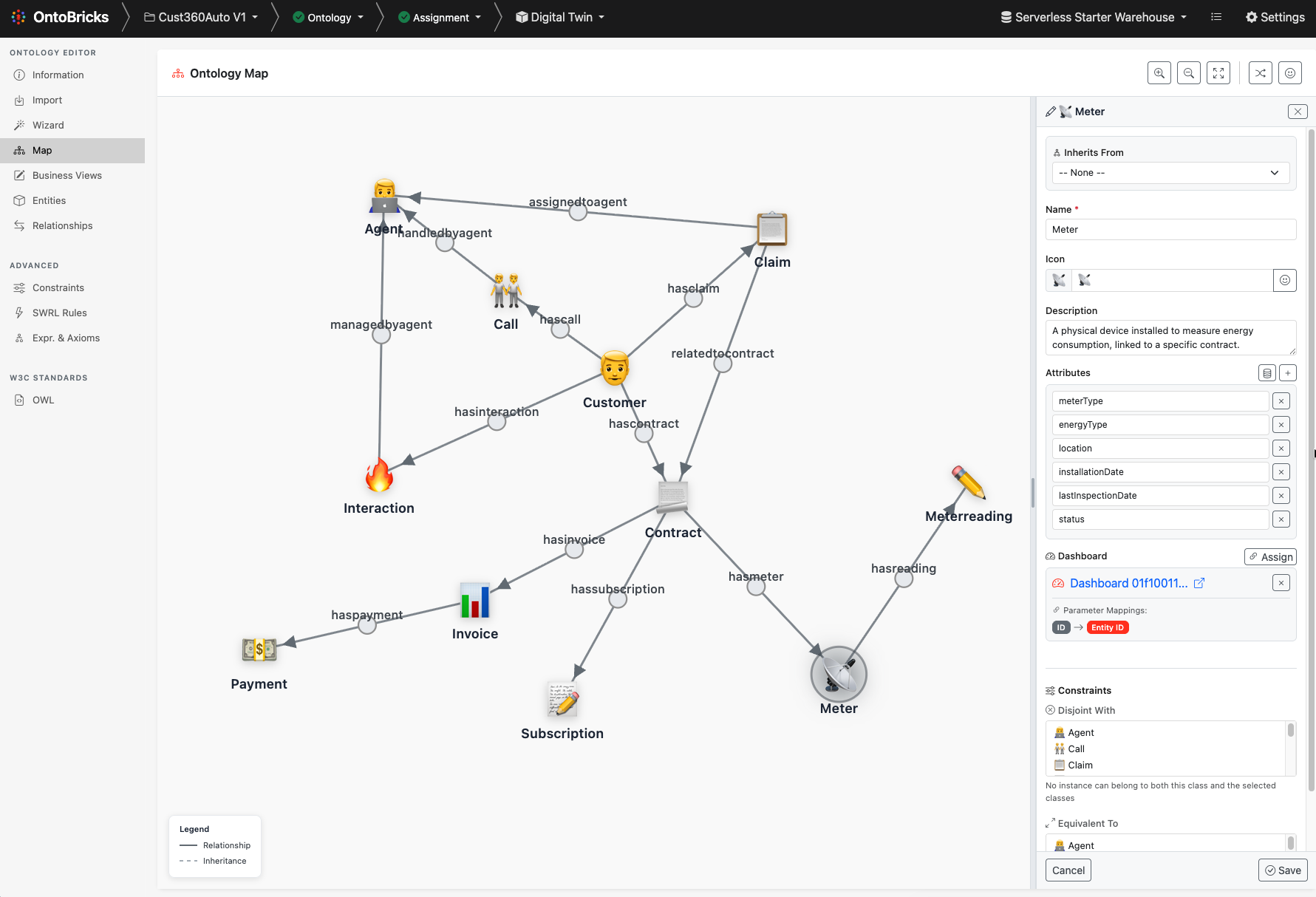
Features
Entity Management
Entities represent ontology classes (owl:Class) and are displayed as interactive boxes on the canvas.
| Feature | Description |
|---|---|
| Name | Editable entity name (click to edit) |
| Icon | Customizable emoji icon for visual identification |
| Description | Optional text description |
| Attributes | Data properties with name and type |
| 4 Anchors | Connection points (top, bottom, left, right) for relationships |
Creating Entities
- Click the + Add Entity button in the toolbar
- A new entity appears on the canvas
- Click on the entity name to rename it
- Use the + button on the entity to add attributes
- Use the 🎨 button to select an icon
- Use the 📝 button to add a description
Entity Properties
Each entity can have multiple data properties (attributes):
{
  "id": "entity_123",
  "name": "Person",
  "icon": "👤",
  "description": "Represents a person",
  "properties": [
    { "id": "prop_1", "name": "email", "type": "string" },
    { "id": "prop_2", "name": "age", "type": "integer" }
  ],
  "x": 100,
  "y": 150
}
Relationship Management
Relationships represent object properties (owl:ObjectProperty) that connect entities.
| Feature | Description |
|---|---|
| Name | Editable relationship name (click on label) |
| Direction | Forward (→), Reverse (←), or Bidirectional (↔︎) |
| Attributes | Optional relationship properties |
| Visual | Solid line with arrow indicating direction |
Creating Relationships
- Click and drag from one entity's anchor (○) to another entity
- A relationship line is created with a label box in the middle
- Click the label to rename the relationship
- Click the direction button (→/←/↔︎) to change direction
- Use the + button on the relationship box to add attributes
Relationship Direction
Each relationship has a direction that controls:
- Forward (→): Domain → Range (e.g., Person → Department)
- Reverse (←): Range → Domain (e.g., Department ← Person)
- Bidirectional (↔︎): Both directions
Click the direction indicator on the relationship box to cycle through options.
Self-Loop Relationships
OntoViz supports recursive relationships (entity linked to itself):
- Displayed as curved quarter-circle arcs
- Relationship box can be positioned around the entity
- Anchors adjust automatically based on box position
Inheritance Links
Inheritance links represent class hierarchies using rdfs:subClassOf.
| Feature | Description |
|---|---|
| Visual Style | Dotted line with hollow triangle arrow |
| Direction | From parent class to child class |
| Property Inheritance | Child automatically inherits parent's attributes |
| Read-Only Inherited | Inherited properties shown as non-editable in child |
Creating Inheritance
- Click the △ Inheritance button in the toolbar to enter inheritance mode
- Drag from the parent entity's connector to the child entity
- A dotted line with hollow arrow appears
- Click the arrow to reverse direction if needed
Property Inheritance
When an inheritance link is created:
- Child entities automatically display parent's properties
- Inherited properties are shown with a visual indicator (read-only)
- Changes to parent properties cascade to all children
- Children can have additional properties beyond inherited ones
Example:
Person (parent)
├── name: string
└── email: string

Employee (child, inherits from Person)
├── name: string (inherited, read-only)
├── email: string (inherited, read-only)
├── employeeId: string (own property)
└── salary: decimal (own property)
Canvas Controls
Navigation
| Control | Action |
|---|---|
| Scroll Wheel | Zoom in/out |
| Click + Drag (background) | Pan the canvas |
| Click + Drag (entity) | Move entity |
Toolbar
| Button | Function |
|---|---|
| + Add Entity | Create a new entity |
| △ Inheritance | Toggle inheritance creation mode |
| Grid Layout | Auto-arrange entities in a grid |
| Center | Fit all entities in view |
| Minimap | Toggle navigation minimap |
Layout Features
Auto-Layout
Click the Grid Layout button to automatically organize entities:
- Uses force-directed algorithm to minimize overlaps
- Places connected entities near each other
- Maintains relationship visibility
Center View
Click Center to:
- Fit all entities within the visible canvas
- Auto-zoom to show the complete diagram
- Useful after loading a large diagram
Minimap
Toggle the minimap for:
- Overview of the entire diagram
- Quick navigation to different areas
- Visual indicator of current viewport
Data Serialization
OntoViz supports JSON import/export for persistence.
Export Format
{
  "entities": [
    {
      "id": "entity_1",
      "name": "Person",
      "icon": "👤",
      "description": "A human being",
      "x": 100,
      "y": 100,
      "properties": [
        { "id": "prop_1", "name": "name", "type": "string" },
        { "id": "prop_2", "name": "email", "type": "string" }
      ]
    },
    {
      "id": "entity_2",
      "name": "Department",
      "icon": "🏢",
      "x": 400,
      "y": 100,
      "properties": [
        { "id": "prop_3", "name": "departmentName", "type": "string" }
      ]
    }
  ],
  "relationships": [
    {
      "id": "rel_1",
      "name": "worksIn",
      "sourceEntityId": "entity_1",
      "targetEntityId": "entity_2",
      "direction": "forward",
      "properties": [
        { "id": "attr_1", "name": "startDate", "type": "date" }
      ]
    }
  ],
  "inheritances": [
    {
      "id": "inh_1",
      "sourceEntityId": "parent_entity_id",
      "targetEntityId": "child_entity_id"
    }
  ],
  "positions": {}
}
Standalone Usage
OntoViz can be used independently of OntoBricks. See the demo at src/front/static/global/ontoviz/index.html.
Basic Integration
<!-- Include OntoViz CSS -->
<link rel="stylesheet" href="ontoviz/css/ontoviz.css">

<!-- Container for the editor -->
<div id="ontoviz-container" style="width: 100%; height: 600px;"></div>

<!-- Include OntoViz JS -->
<script src="ontoviz/ontoviz.js"></script>

<script>
// Initialize OntoViz
const canvas = new OntoViz(document.getElementById('ontoviz-container'), {
    showToolbar: true,
    showMinimap: true,
    snapToGrid: true,
    gridSize: 20
});

// Add entities
const person = canvas.addEntity({
    name: 'Person',
    x: 100,
    y: 100,
    icon: '👤',
    properties: [{ name: 'name', type: 'string' }]
});

const dept = canvas.addEntity({
    name: 'Department',
    x: 400,
    y: 100,
    icon: '🏢'
});

// Add relationship
canvas.addRelationship({
    name: 'worksIn',
    sourceEntityId: person.id,
    targetEntityId: dept.id,
    direction: 'forward'
});

// Export data
const data = canvas.toJSON();
console.log(JSON.stringify(data, null, 2));
</script>
Configuration Options
new OntoViz(container, {
    // Display
    showToolbar: true,      // Show the toolbar
    showMinimap: true,      // Show navigation minimap

    // Grid
    snapToGrid: true,       // Snap entities to grid
    gridSize: 20,           // Grid cell size in pixels

    // Behavior
    autoLayout: false,      // Auto-layout on load
    readOnly: false,        // Disable editing

    // Styling
    defaultEntityIcon: '📦' // Default icon for new entities
});
Event Callbacks
OntoViz provides callbacks for integration with external systems:
new OntoViz(container, {
    // Entity events
    onEntityCreate: (entity) => {
        console.log('Entity created:', entity.name);
    },
    onEntityUpdate: (entity) => {
        console.log('Entity updated:', entity.name);
    },
    onEntityDelete: (entity) => {
        console.log('Entity deleted:', entity.name);
    },

    // Relationship events
    onRelationshipCreate: (relationship) => {
        console.log('Relationship created:', relationship.name);
    },
    onRelationshipUpdate: (relationship) => {
        console.log('Relationship updated:', relationship.name);
    },
    onRelationshipDelete: (relationship) => {
        console.log('Relationship deleted:', relationship.name);
    },

    // Inheritance events
    onInheritanceCreate: (inheritance) => {
        console.log('Inheritance created');
    },
    onInheritanceDelete: (inheritance) => {
        console.log('Inheritance deleted');
    },

    // Selection events
    onSelectionChange: (selection) => {
        console.log('Selection changed:', selection);
    }
});
API Reference
OntoViz Class
Constructor
const canvas = new OntoViz(container, options);| Parameter | Type | Description |
|---|---|---|
container |
HTMLElement | DOM element to render into |
options |
Object | Configuration options |
Entity Methods
| Method | Description |
|---|---|
addEntity(options) |
Create and add a new entity |
updateEntity(id, updates) |
Update entity properties |
removeEntity(id) |
Delete an entity (and its relationships) |
getEntity(id) |
Get entity by ID |
getEntities() |
Get all entities |
Relationship Methods
| Method | Description |
|---|---|
addRelationship(options) |
Create a relationship between entities |
updateRelationship(id, updates) |
Update relationship properties |
removeRelationship(id) |
Delete a relationship |
getRelationship(id) |
Get relationship by ID |
getRelationships() |
Get all relationships |
Inheritance Methods
| Method | Description |
|---|---|
addInheritance(options) |
Create inheritance link |
updateInheritance(id, updates) |
Update inheritance |
removeInheritance(id) |
Delete inheritance link |
getInheritedProperties(entityId) |
Get inherited properties for an entity |
Layout Methods
| Method | Description |
|---|---|
autoLayoutGrid(options) |
Arrange entities in a grid |
centerDiagram(options) |
Center and fit diagram in view |
zoomToFit() |
Zoom to show all content |
Serialization Methods
| Method | Description |
|---|---|
toJSON() |
Export diagram as JSON |
fromJSON(data) |
Import diagram from JSON |
clear() |
Clear all content |
OWL Generation
When used with OntoBricks, OntoViz generates W3C-compliant OWL:
Entity → owl:Class
:Person a owl:Class ;
    rdfs:label "Person" ;
    rdfs:comment "A human being" .

:name a owl:DatatypeProperty ;
    rdfs:domain :Person ;
    rdfs:range xsd:string .
Relationship → owl:ObjectProperty
:worksIn a owl:ObjectProperty ;
    rdfs:domain :Person ;
    rdfs:range :Department .
Inheritance → rdfs:subClassOf
:Employee a owl:Class ;
    rdfs:subClassOf :Person ;
    rdfs:label "Employee" .
Naming Conventions
Entity, relationship, and property names must follow these rules:
| Rule | Description |
|---|---|
| Characters | Letters, numbers, underscores (_), hyphens (-) |
| No Spaces | Use underscores or CamelCase instead |
| No Symbols | Special characters are not allowed |
| Case Sensitive | Person and person are different |
Recommended Conventions:
- Entities: PascalCase (e.g.,
Person,CustomerOrder) - Relationships: camelCase (e.g.,
worksIn,hasOrder) - Properties: camelCase (e.g.,
firstName,orderDate)
Files Structure
src/front/static/global/ontoviz/
├── ontoviz.js              # Main library code
├── index.html              # Standalone demo page
├── ontoviz_instructions.txt # Feature specifications
└── css/
    ├── ontoviz.css         # Main entry (imports all)
    ├── ontoviz-variables.css # Design tokens / CSS variables
    ├── ontoviz-entity.css  # Entity styling
    ├── ontoviz-relationship.css # Relationship & inheritance styling
    └── ontoviz-ui.css      # UI components (toolbar, minimap)
Theming
OntoViz uses CSS variables for theming. Customize by overriding these variables:
:root {
    /* Entity colors */
    --ontoviz-entity-bg: #ffffff;
    --ontoviz-entity-border: #dee2e6;
    --ontoviz-entity-header-bg: #f8f9fa;

    /* Relationship colors */
    --ontoviz-relationship-line: #6c757d;
    --ontoviz-relationship-arrow: #6c757d;

    /* Inheritance colors */
    --ontoviz-inheritance-line: #adb5bd;

    /* Canvas */
    --ontoviz-canvas-bg: #f5f5f5;
    --ontoviz-grid-color: #e0e0e0;
}
Browser Support
OntoViz works in all modern browsers:
- Chrome 80+
- Firefox 75+
- Safari 13+
- Edge 80+
No external dependencies required (uses vanilla JavaScript and CSS).
License
MIT License - OntoViz is open source and can be used in commercial projects.
See Also
- User Guide — consolidated usage guide
- Getting Started — installation and configuration